
Improvements
Multi-booking Editing – New Screen and New Features
We have added a new, significantly improved screen for editing multiple bookings simultaneously, featuring contextual orientation support.
Currently, the new screen can be opened from the "Bookings - Advanced Search" screen. Select the desired bookings, and from the additional functions, choose Open → Edit (New). It will soon be accessible from other areas within the system as well.
- Contextual Orientation. The multi-booking editing screen contains a large number of fields. While this allows you to edit a vast amount of information simultaneously, it can also make the user interface more cluttered and harder to navigate.
Therefore, we have added the ability to create and save custom views with your selected fields and layout. This allows you to set up separate views for frequently performed tasks (contexts), ensuring the screen is optimised for each specific operation.
For example:
If you frequently populate the "Marketing Segment" field in bookings, you can create a view that contains only the necessary fields for determining and filling out the marketing segment.
Another example is editing meals for group bookings – such as removing breakfast for the final day of the stay or replacing it with a packed lunch. A specialised view containing only the required fields will significantly speed up and simplify the editing process for the entire group.
Use the "Custom Views" button (the third button from right to left) to:
- search for the necessary columns;
- select which ones should be visible;
- determine their arrangement;
- save the configuration as a "Custom View", which can then be selected with just a single click.

- Quick Fill for All Bookings. We have added a new feature (the lightning bolt button) to all fields, allowing you to populate all selected bookings with the same value.
Whether you are editing a departure date, agent, meal, charge router, or any other field, you can use the quick fill feature to apply the chosen value to all bookings at once. Similarly, you can also remove an incorrectly set value from a specific field across all selected bookings.
 We are confident that this functionality will save you significant time during routine operations and eliminate the need to edit each booking individually.
 - We have retained and improved keyboard navigation support. You can use:
- Tab – to move to the next field;
- The Arrow keys on the keyboard – to select items;
- Enter – to confirm the selection;
- Esc – to close popup windows.
- Editable Fields:
- We have kept all the fields that were available in the previous editor: Guaranteed, Arrival, Arrival Time, Stay, Departure, Departure Time, Adults, Children, Children Age, Room Type / Room, First Meal, Company / Event, Reference Number, Reference Date, Transfer Arrival, Transfer Departure, Meal, Rate, Marketing Source, Marketing Channel, Marketing Segment, Guarantee Option, and the Main Guest fields.
- We have also added new fields and editors: Agent, First Meal, Early Arrival, Late Departure, Manual Router, Disable Room Change, Accept Charge Transfers, Restaurant, Non-standard Meals.
- We have added the following new capabilities as well:
- New Event/Block Selection Approach– The interface for selecting an Event and Block has been significantly improved. They are displayed based on the selected company and the booking period, making the list more compact, convenient, and faster to navigate.
- Guest profile – The ability to search for existing profiles, edit them, and create new profiles.
- Protection against using the same guest profile across multiple bookings – An analysis has been added to detect such cases and flag potential issues, preventing you from making mistakes.

Check-in Kiosk – Streamlined Access
After monitoring the usage of the new Check-in Kiosk, we came to several practical conclusions:
- There is always a portion of guests who, for various reasons, have not received their QR codes or PIN codes to access the Kiosk. The most common reason is that OTA channels blocked or altered the messages you sent.
- There are also guests who received the required information but did not read it or did not understand how to use it.
When such guests arrive and try to use the Kiosk, they fail to log in. If there is no staff member on shift at that moment, or if they cannot contact you to obtain an access PIN, this can become a serious issue.
If you frequently encounter similar situations, you can now activate the new streamlined access option for the Check-in Kiosk.
What does streamlined access entail?
The new option requires the guest to provide only information they definitely know – their name, entered in a highly straightforward and intuitive manner.
- The system prompts the guest to enter their last name. If there is only one arriving or checked-in booking with that last name (only main guests are considered), this is sufficient to access the kiosk.
- If there are two arrival or checked-in bookings with the same last name, the Kiosk also requires entering the first name. If both names match, the guest is granted access.
- If, for any reason, there is more than one booking with main guests sharing identical names, the Kiosk displays the matching bookings and allows the guest to select theirs.
Is this approach secure enough?
The short answer is – NO.
From an information security perspective, identification based solely on a name is not reliable enough. Our recommendation is to use streamlined access only if you actually face the issues described above and if the inconvenience to guests outweighs the risks you assume.
If you decide to enable this functionality, please keep the following risks in mind:
- It is possible for someone to check into another guest's booking if they know or guess the last name of a real guest.
- It is possible to issue a new card via the "Lost Card" feature for an already occupied room if someone knows or guesses the last name of a real guest.
- The booking folio contains personal data, including the guest's full name and address. Under certain circumstances, this information could become accessible to someone who knows or guesses the guest's last name.
How can login options be combined?
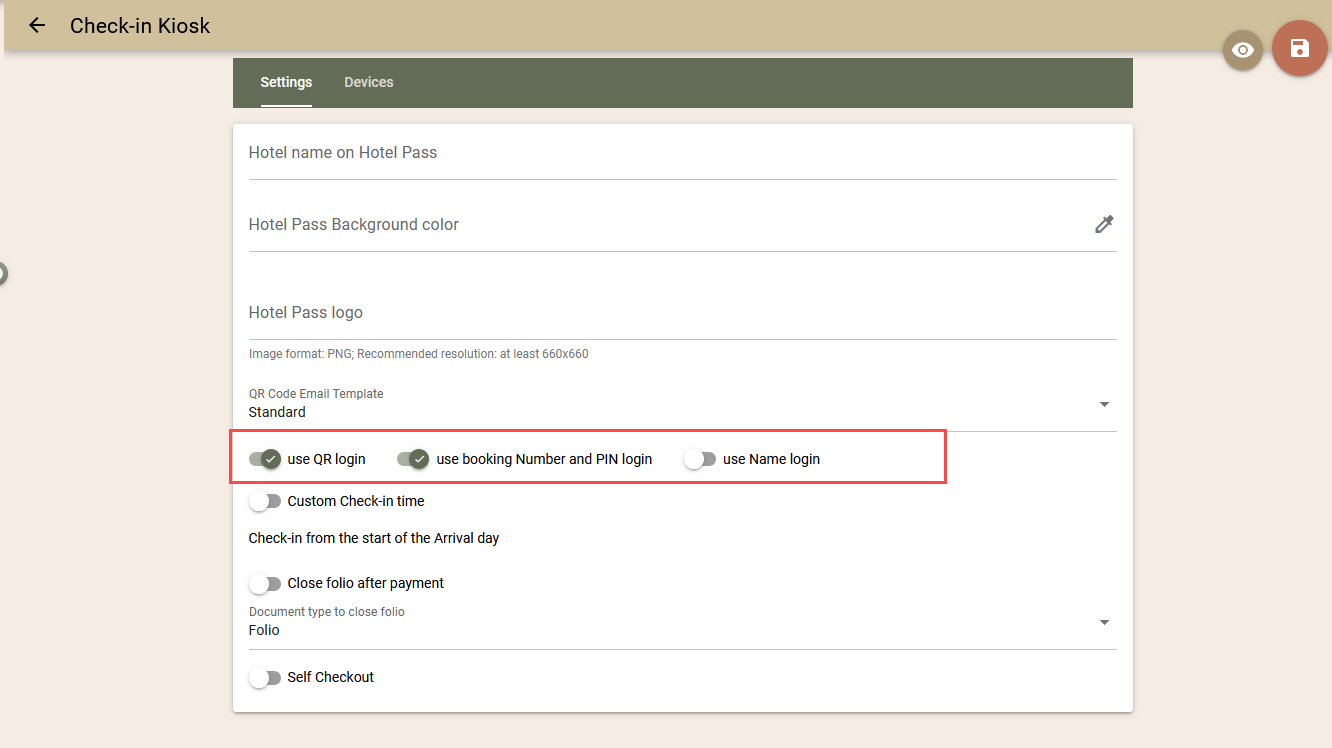
Three login methods are now available in the Check-in Kiosk settings:
- QR code;
- Booking number and PIN;
- Guest name.
You can enable one or a maximum of two of these options. The selected methods will be displayed on the Kiosk's home screen.
Coming Soon!
We are continuing our work on the registration process itself as well. Until now, a guest could register on their mobile device before arrival or upon arrival by scanning a QR code displayed on the Kiosk. Soon, we will add another option that will cover all registration scenarios.
If the guest has not pre-registered, upon arriving at the Kiosk, they will be able to choose between:
- registration on a mobile device (as it is currently);
- registration directly on the Kiosk itself (new functionality).
This ensures that even if a guest does not have a mobile phone, internet connection, or battery life, they can smoothly complete the check-in process. We will share more information about the new process very soon.
New Screen for Searching and Editing Guest Profiles. Link with Company.
We have launched the new, completely redesigned screen for Guest profiles, to which we have also added a new feature – a link with a Company.
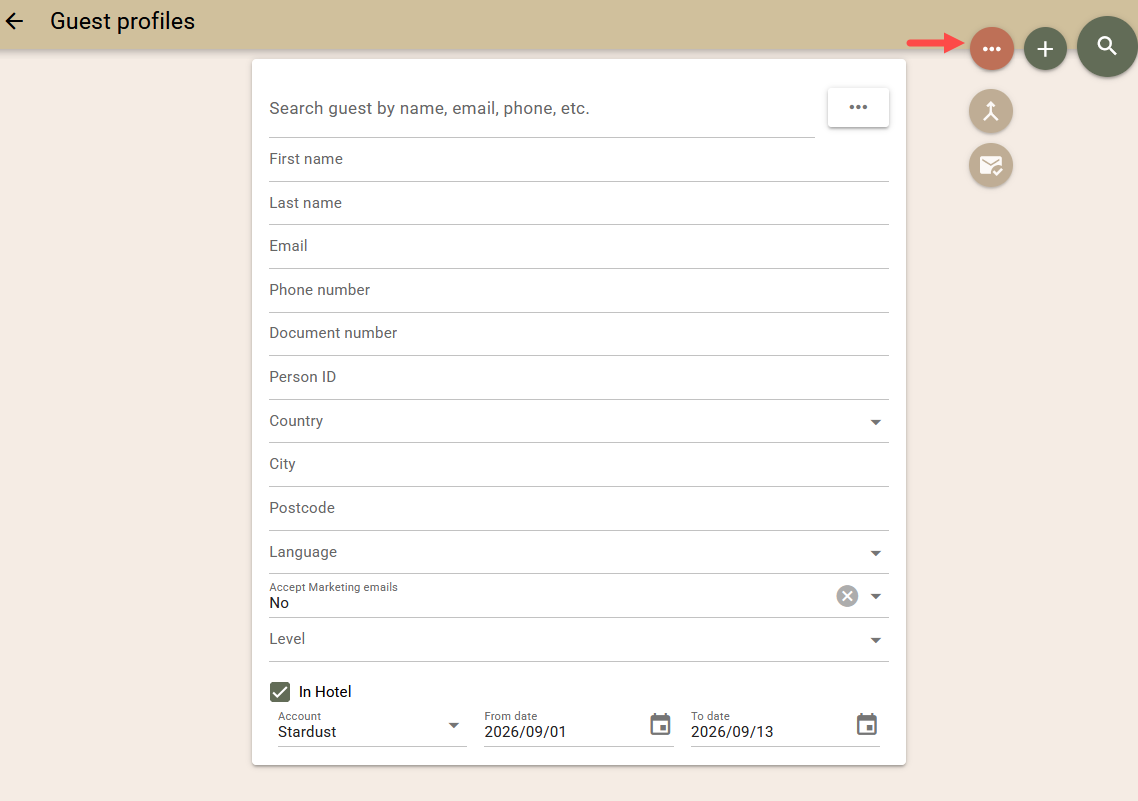
The new search screen can be accessed from the Bookings → Guest profiles menu using the "New" button.
Here are the main improvements:
- New, Improved Search. The new search screen combines previous search methods (text search and the old "Advanced Search") and introduces new criteria for finding profiles. You can now search by: Names, Email, Phone, Document Number, Personal ID Number, Country, City, Postal Code, Language, Level, and Marketing Opt-in status.
In addition, you can discover profiles that have bookings for a selected hotel and period.
- From the additional functions menu, you can select the found profiles and either "Merge" them manually or add them to a "Mailing list".
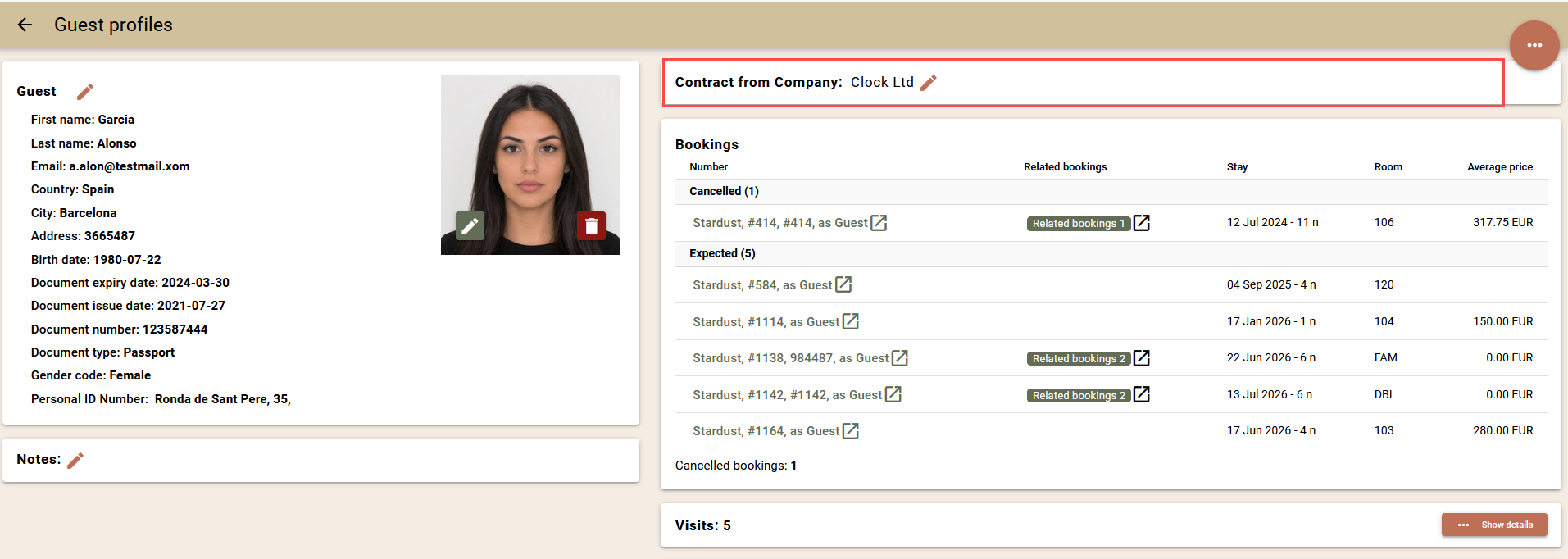
- New Guest Profile Screen. The profile screen itself has been entirely redesigned with a clearer organization of information and more convenient navigation.
The ability for quick editing via in-place editors has also been added, allowing you to modify data directly within the respective field.
- Company Contract. We have added a new feature that simplifies working with corporate guests. You can now link a specific Guest profile to a Company and/or its Company Contract.
When selecting a guest profile in the "Repeater" field on the "Rates and Availability" screen, the system automatically:
- populates the "Company" field in the booking;
- displays rates from the Company Contract, if one is available;
- applies the charge routing rules specified in the Corporate Contract, if configured.
- Company Contract. We have added a new feature that simplifies working with corporate guests. You can now link a specific Guest profile to a Company and/or its Company Contract.
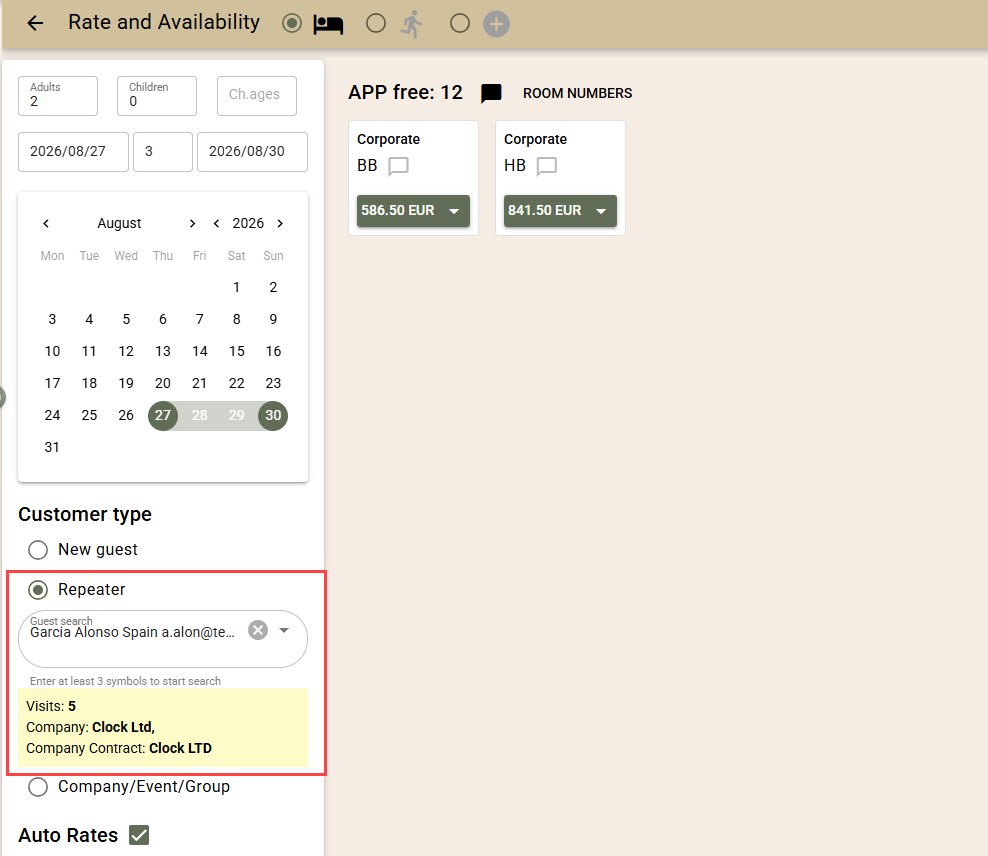
Thanks to this connection, it is enough to select the guest as a "Repeater", and the system will automatically find the linked "Company", apply its special rates and billing conditions, and implement them when creating the booking.
Other Improvements
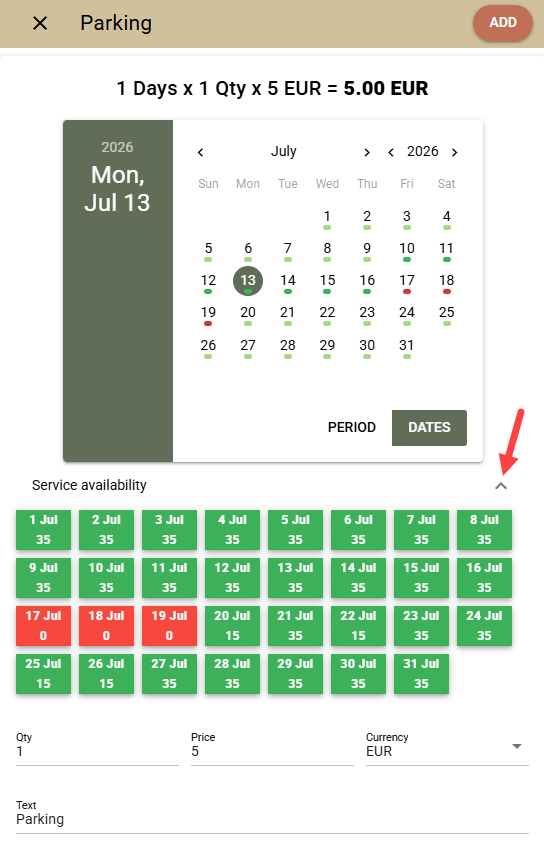
- Folios – Service Availability with a Capacity Counter. When posting extra services into folios, you can now easily check their availability without needing to perform additional actions.
If the service's capacity is tracked via a Capacity Counter, the system automatically shows whether there is sufficient availability for the selected quantity and indicates which dates have or do not have free capacity.
As a reminder, via the Capacity Counter functionality, you can monitor the availability of services with limited capacity, such as parking spaces, baby cots, extra beds, excursions, and any other extra services.
Once you select a service with an active capacity counter for posting:
- In the date selection calendar, you will see a green or red indicator for each date, depending on whether there is enough availability for the entered quantity. If you change the quantity, the indicator updates in real time.
- Use the new „Service availability“ link below the calendar to view the exact availability for each date.
- "Birthday list" Report. Now includes guests from bookings departing on the selected date as well.
Fixes
- D-Edge – The mechanism for sending confirmations to the partner for received bookings has been improved, particularly for bookings with more than one room.
- Card Transactions – Resolved an issue where errors occurred when attempting to refund transactions processed via a previous payment gateway after switching payment gateways.
- Rates and Availability – Resolved an issue where requests containing different types of Occupancy-based Rates (based both on general availability and availability by room type) failed to select the correct level.
- Folios – Resolved an issue where the error message for the missing permission „Company: Create, Edit Name“ was not displayed when an unauthorised user attempted to issue an invoice addressed to a new company.
- Arrivals/ In Hotel Screens – The „Confirmed Registration“ icon is no longer tied to the *„Online Checked-in“ status. If all registration cards linked to the booking are confirmed, whether by a user or via the ID Processor, the icon is now correctly visualised.
Integrations
- Private Analytics. A new user right has been added for access to reports in the "Private Analytics" section. The new right provides more precise control over access to sensitive reference data. To avoid causing difficulties for existing users, the right has been automatically granted to everyone. If necessary, you can easily deactivate it from the settings for users and user groups.
- GREECE – AADE/myDATA (Epsilon Digital). A new setting (ToDo Channel) has been added, through which you can select the channel to which notifications should be sent when errors occur.
- Lightspeed POS K Series. The interface behavior has been improved. Charges are now created in accordance with the configured charge routing rules. In this way, the creation of charges is identical, regardless of whether they are entered manually or are the result of a transfer from Lightspeed POS K Series.
- Gastronovi POS. The option to transfer to an event folio has been added. You can now transfer charges to open folios of events with the "Checked-in" status. For the transfer to be possible:
- The event's company must be configured to accept charge transfers;
- In the interface settings, the option "Transfer by event folios" must be enabled.
- For easier visual orientation, event folios have the prefix "zE", and company folios have the prefix "zC".
- A new field "Company" has also been added to the room selection screen for transfer. The integration is adapted so that the "Company" field is filled in correctly for both company folios and event folios.
- BRP. An issue has been resolved where, in certain cases, it was not possible to change the Business Unit in the interface settings.
- PEPPOL e-Invoicing with gateway (billit.eu). The method of configuring the recipient identifier has been changed. Instead of a single fixed Receiver ID, you can now configure multiple identifiers.
This allows documents to be sent to different clients using different types of identifiers, such as KVK, OIN, VAT, and others.
If the client has more than one identifier, the document is sent with all available identifiers, and the PEPPOL network automatically uses the one with the highest priority.
The change also adds the option for document export outside the PEPPOL network (for example, to Chorus Pro in France), which covers the upcoming requirements for mandatory electronic invoicing in various countries.