
Improvements
- Instructions for routing charges to monthly folio. New routing instructions have been added to automate monthly invoicing when working with a Company or Agent, where the agreements are based on the month of arrival or departure of the bookings. Two instructions for Company and two instructions for Agent have been added to the existing instructions for creating folios. These allow charges to be automatically transferred to monthly folios based on the month of arrival or the month of departure of the booking.
Example: All bookings for a given Company arriving in January 2026 can be automatically routed to a folio named "2026-01", those for February to folio "2026-02", and so on.
Important: These routing instructions differ from the existing Monthly Invoicing functionality, which is designed for long-stay bookings. The difference is that the routing instructions are guided by the month of arrival or departure of the booking, while monthly invoicing is aimed at distributing charges by month for a prolonged stay.
- "Rate and Availability" screen (new) – reference date and individual references for each booking from the cart. In the "Rate and Availability" screen (new), new possibilities related to the reference data have been added:
- It is now possible to fill in a reference date, in addition to a reference number;
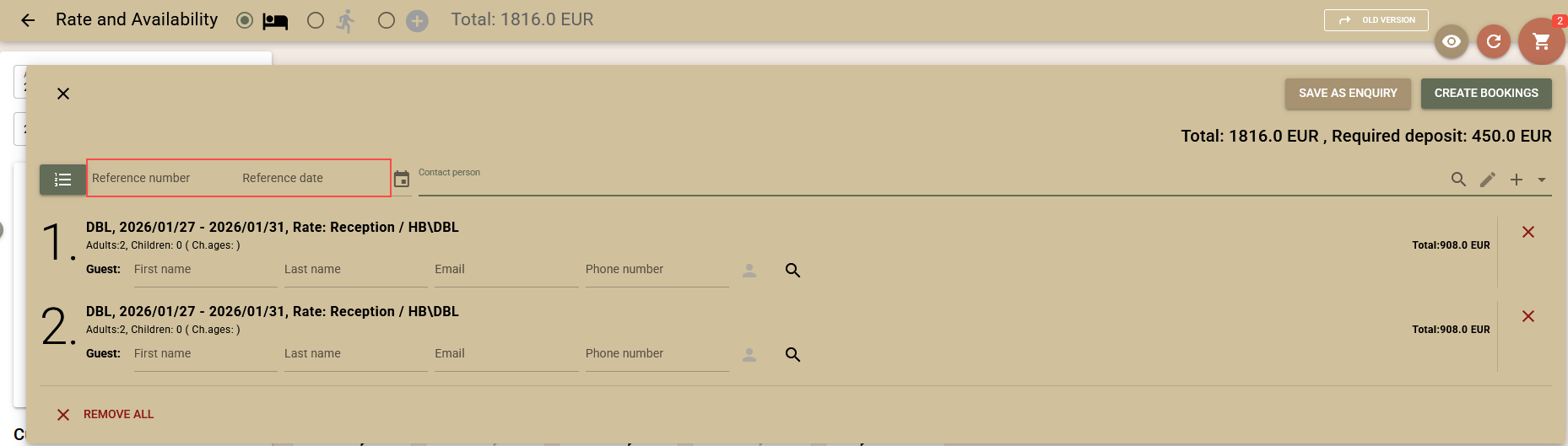
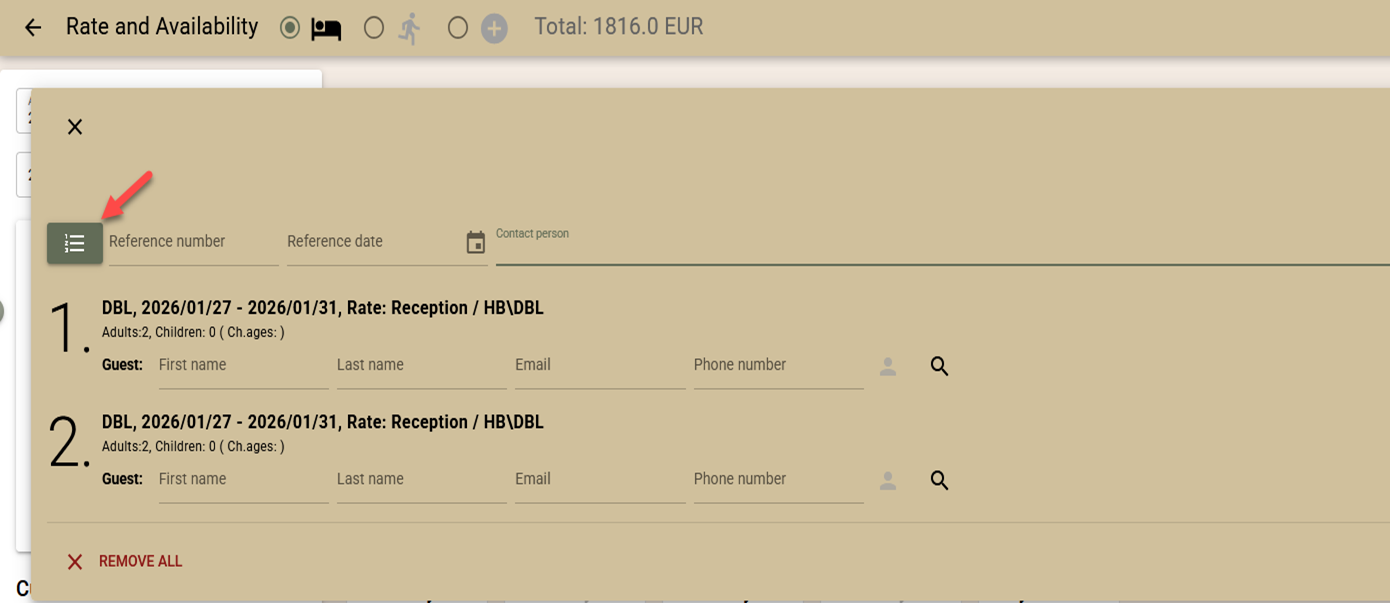
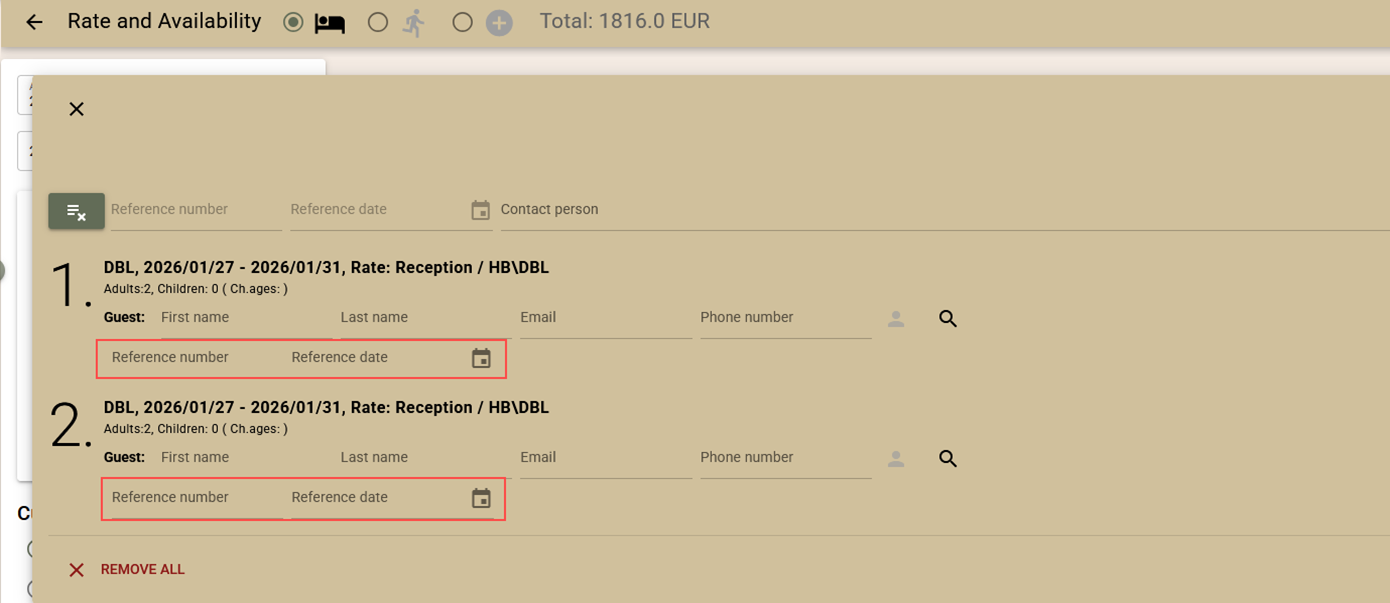
- If there is more than one booking with different reference numbers, it is possible to enter different reference numbers and dates for each row(booking). To do this, use the button next to the reference number field at the top of the screen. This disables the common reference fields and adds the same fields to each row of the cart. By pressing the button again, you can return to the general input mode.
- It is now possible to fill in a reference date, in addition to a reference number;
- Housekeeping tasks – automatic generation. The ability to automatically generate housekeeping tasks at a pre-set time has been added. Keep in mind that automatic generation can be executed up to 15 minutes late compared to the set time. The setting is done from the menu Settings → Housekeeping → Automatically generate tasks.
After setting a time for the next generation (for example, 06:00), the tasks will be generated automatically every day at the same time. To stop the automatic generation, the field must be cleared and saved.
Integrations
PEPPOL e-Invoicing (gateway: billit.eu)
- The Purchase Order Number value from the closing folio is now exported as a Reference to PEPPOL. This field is often used by customers to validate the document.
- Added the ability to send company contact person details – First name and Last name from the Contact Info section. This information helps large organisations identify the department from which the expense was made.
- Folio remarks are now exported as Comments in the PEPPOL document. They often contain important information that needs to reach the customer.
- In order to bring the appearance of PEPPOL documents as close as possible to those generated by Clock, print_text support has been added to charges when entered. If print_text is missing, the name of the charge is exported as before.
- Added balance support for the sent folio. This allows the customer to easily see how much is still owed on the specific document if it has been partially paid.
- Added the option to export the source of the charges. It is now possible to include the source of the charges in the PEPPOL document. The source most often contains details of the booking, including the period of stay and the main guest. The aim is to bring the appearance of documents exported to the PEPPOL network closer to the standard appearance of documents in Clock. The functionality must be explicitly enabled from App Connector → PEPPOL and e-Invoice connectivity with Billit.eu → Settings
- Export of documents in compact view. Added the ability to export PEPPOL documents in a compact view. There is now a Compact modeoption in the interface settings, which works as follows:
- Compact mode disabled – charges are sent in detail as before;
- Compact mode enabled – charges are grouped analogously to the Compact view of folios:
- grouping by tax % and print_text;
- when print_text is missing, the text field is used;
- since PEPPOL requires a quantity (qty) field, it is always submitted with a value of 1.
Localisations
Italian Invoice Export. The way VAT Payment Method information is exported (EsigibilitaIVA) has been changed. Until now, Split VAT Payment was only allowed for B2G documents (SDI number with 6 characters). As a result of regulatory changes, Split VAT Payment can now also be used by other companies with an SDI number of 7 characters, so this control has been removed. When using Split VAT Payment, the ImportoPagamento field (balance to pay) now takes into account the value excluding VAT, as the tax is paid directly by the customer to the state.