
Upcoming French eInvoice Mandate and Clock
France is preparing for the introduction of mandatory electronic invoicing (eInvoicing), which will gradually become applicable to businesses over the coming years. At Clock, we have this already covered to ensure our customers remain compliant and well prepared.
We are pleased to confirm that our global invoicing and PEPPOL partner, Billit, already supports French electronic invoicing requirements and is actively participating in the evolving ecosystem.
What does this mean for Clock customers?
- Continued support for electronic invoicing workflows;
- Integration with a trusted international invoicing partner;
- Minimal operational changes for existing Billit integration users.
The current rules:
- Exchanging e-invoices with French private companies
To send e-invoices to French companies, you will need to work through a service provider or PA.A PA is a software provider that give companies access to the PPF, the official government portal where all invoices and payments must be reported. The PPF then forwards all data to the French tax authorities (DGFiP). Software packages that wish to register as a Plateforme Agréée must go through a strict selection process. Billit is one of these approved PAs and is currently running a pilot project with a number of companies.
At this time, it is not yet possible to send and receive invoices via a Plateforme Agréée. This process is still being actively developed by the French government.
Exchanging e-invoices with the French government
At the moment, all e-invoices to the French government will need to be sent to the Chorus Pro platform. You can now deliver your electronic invoices to Chorus Pro through Billit. You will need a Chorus account for this. In the future, e-invoices for the French government will also need to be delivered via a Platforme Agréée (PA).
Prepare your Billit account
As we already mentioned, sending documents through the PEPPOL network requires the use of a PEPPOL Gateway. For this purpose, we have chosen to work with one of the leading PEPPOL Gateway providers — Billit.eu.
To send documents, you will need a Billit account, and you can create one right away here:
Once your Billit account is ready here are the details you will need from it for the Clock Hospitality Cloud configurations.
Log in to your Billit account
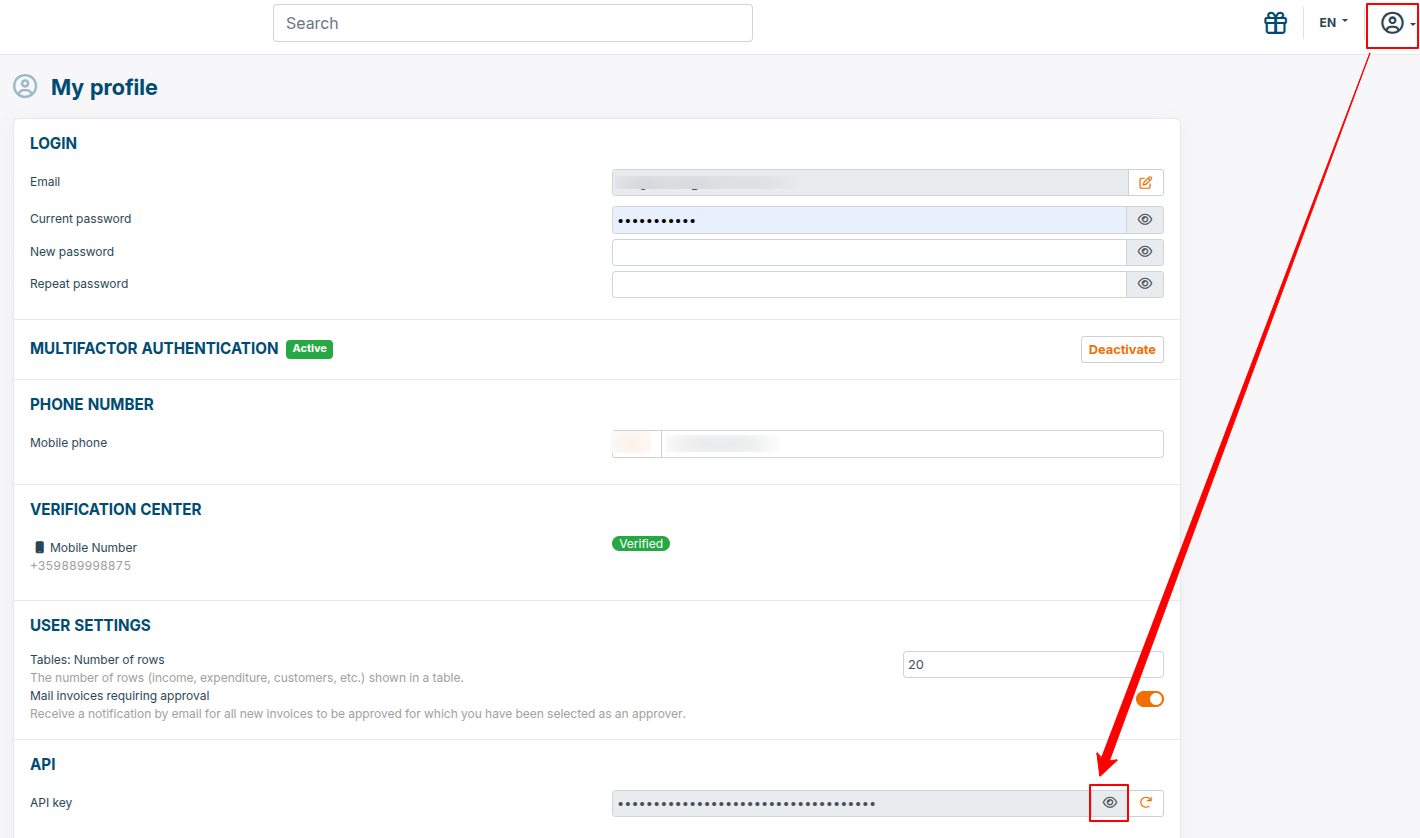
- API Key. Collect your API key as show bellow:
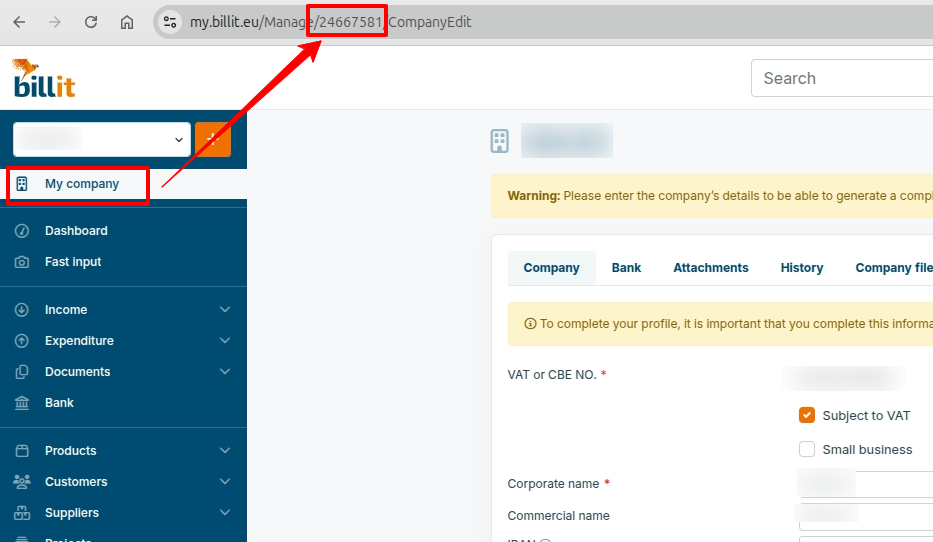
- Party ID. Collect your Party ID as show bellow:
Activation
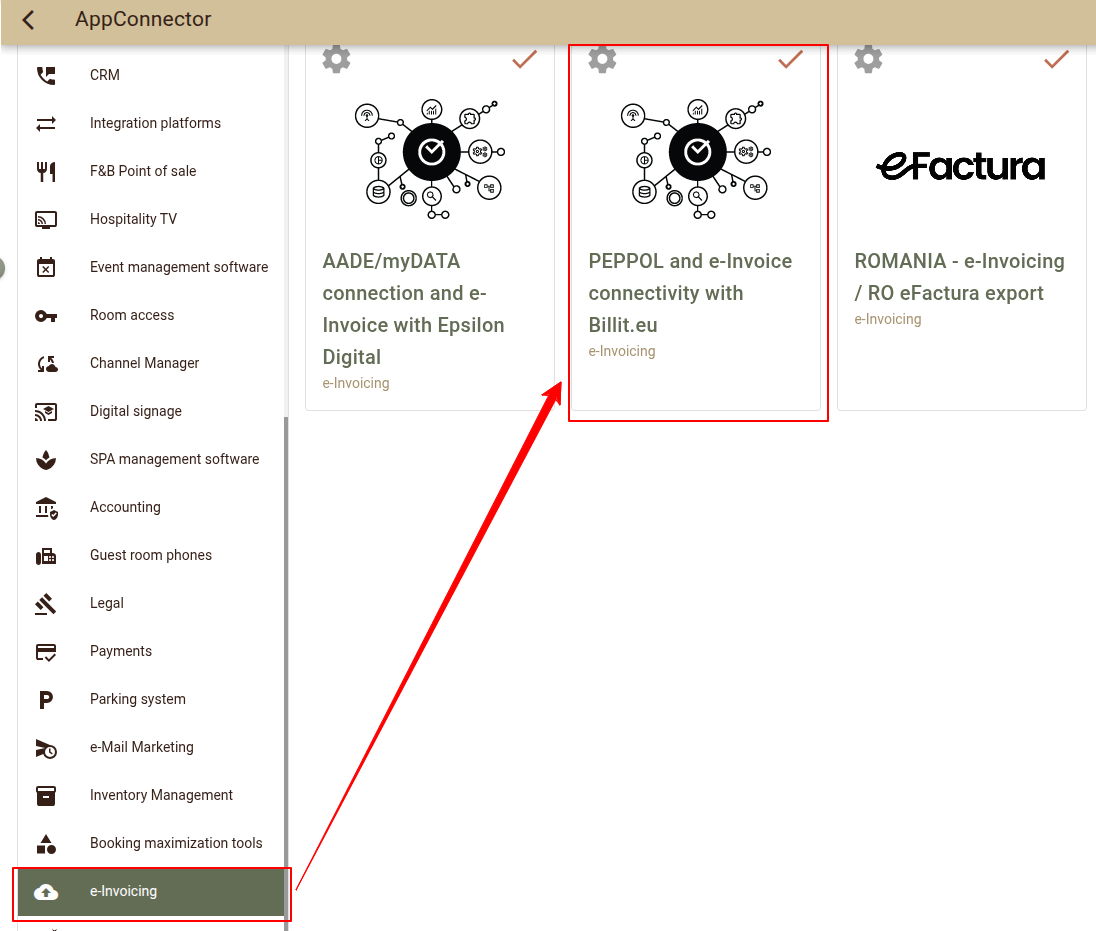
Activate the integrarion from AppConnector(Settings > AppConnector) under "e-Invoicing" category.
Once the integration is activated open Settings.
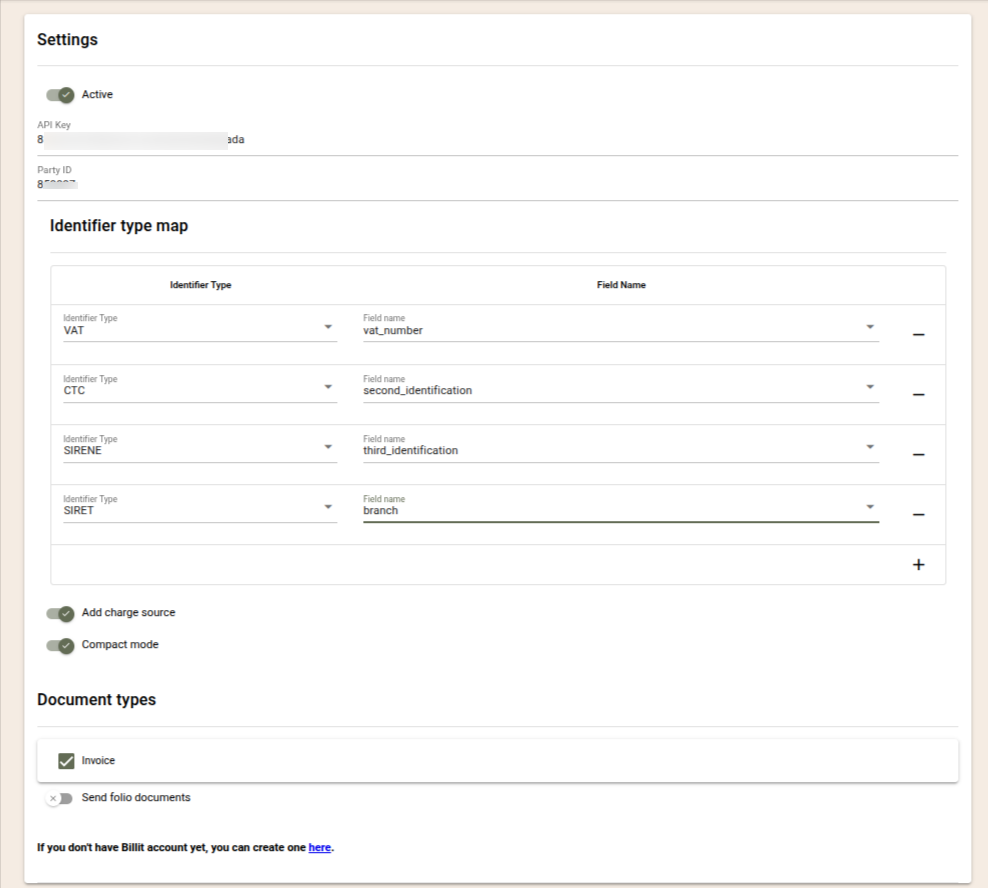
- Active - Select if the interface should be active and send documents.
- API key - Paste here your Billit API key.
- Party ID - Paste here your Billit Party ID.
- Identifier type map - The Recipient Identifiers section is used to configure the identifier(s) that uniquely identify the invoice recipient within the PEPPOL network (or another supported e-invoicing network). These identifiers allow the network to determine where the electronic invoice should be delivered. You can configure one or more identifiers, such as CTC, SIRENE, VAT, SIRET and Service Code. If multiple identifiers are configured, all available identifiers are included in the document, allowing the receiving network to automatically select the appropriate one based on its priority rules. This also enables document delivery outside the PEPPOL network as Chorus Pro in France.
- *Important notes for France
- Before you can send documents via Chorus Pro your Billit account should be configured to work with your Chorus Pro one. A guide how to configure Billit is enclosed to this article.
- To send eInvoice, at least one of the configured identifier field/s of the company must be filled before the folio is closed. This allows you to control which companies receives eInvoices and which not. To Make sure onliy the B2G invoices will be sent at first it will be best to create special identifier fields and fill them in only for the government companies.
- *Important: If the identification of the receiver is not stored in any of the standard company fields you may need to create a Company custom field for this purpose. To do so, navigate to Settings -> All settings -> Company custom fields to create the appropriate field
- *Important notes for France
- Add charge source - Enable it to add the charges source for the invoice. The source most often contains details of the booking, including the period of stay and the main guest;
- Compact mode - Select how detailed the view of the PEPPOL document would be:
- Compact mode disabled - Every charge is exported separately.;
- Compact mode enabled - Charges are grouped analogously to the Compact view of folios:
- grouping by tax % and print_text;
- when print_text is missing, the text field is used;
- since PEPPOL requires a quantity (qty) field, it is always submitted with a value of 1.
- Document types - Select the document types which should be sent via PEPPOL / e-Invoicing. If the folios closed without a document type (Close as Folio option) should be exported, enable "Send folio documents?";
Use
Once configured you can have your documents sent to their recipients.
The documents are processed in batches every hour. The following documents will be processed:
- The document should be closed with a document types enabled in the configurations.
- The configured Identifier field(s) for the customer must be filled in. This is how you configure which customers will receive e-Invoices and which not.
- An overview of the processed documents as well as their status (successful or not) are available in the Audit logs (Settings -> AppConnector -> PEPPOL and eInvoice connectivity with Billit.eu -> Settings -> Logs).
- The Purchase Order Number value from the closing folio is exported as a Reference to PEPPOL. This field is often used by customers to validate the document.
- Company contact person details are exported – First name and Last name from the Contact Info section. This information helps large organisations identify the department from which the expense was made.
- Folio remarks are exported as Comments in the PEPPOL document. They often contain important information that needs to reach the customer.
- Charge print text - When the charge print text is added it will be exported as a charge name.