
Improvements
Customer display
When guests fill in and sign the registration card via the Customer display, we have paid special attention to the guest's email address. Similar to Online Check-In and the Kiosk, if the guest's email address is masked by an online portal, entering the guest's actual email address is explicitly required.
If the registration card has already been signed electronically (via Online Check-In, the Kiosk, or the Customer display itself), the hotel policy screen is skipped and a repeat signature is not required. In this way, the Customer display allows for even faster and more convenient collection of additional personal details from the guest, such as email address, phone number, reason for visit, etc.
At the final step (reviewing the policy, details, and signing), the hotel policy from the registration card is now used, rather than the general hotel policy as was previously the case.
We have improved the feedback to the staff member. When a guest completes the details on their registration card, they are instantly displayed on the staff member's screen. In addition, a notification appears to draw their attention to the entered information.
Other Improvements
Online Check-in – we have added a check that prevents registering multiple guests with the same ID card or passport (similar to the Check-in Kiosk). Please note that the requirement for the number of registration cards is configurable. You can choose whether one registration card is required for the entire booking, one for each adult, or one for each guest, including children.
POS – when using the option to transfer bills to a company in the PMS, we have optimised the loading of the company list so that even with a large number of companies, loading is fast.
D-EDGE – migration to A2021. Due to the discontinuation of support for the previous version of the protocol, D-EDGE required a switch to the newer A2021 version. There are no significant changes to the interface functionality. Here are the details:
- Export – if no maximum stay is set, MaxStay = 0 is sent instead of 99, as was previously the case.
- Extras– to the supported extras charging model (PerNight), we have added three more models:
- PerStay – charged upon arrival.
- PerGuest – quantity is calculated using the formula qty = guest count × quantity.
- PerGuestPerNight – similar to PerNight, with the quantity calculated using the formula qty = guest count × quantity.
- Nightly rates – we have made a minor change to price processing. Prices according to the tax model in Clock are now used. The new fields unitPriceAfterTax or unitPriceBeforeTax are used instead of unitPrice, as was previously the case.
- Guest count – the fields @adultCount and @childCount are now used, distributing the guest count across rooms.
- Payment information – the values of the attributes paidamount, dueAmountAtBooking, and dueAmountOnArrival are added to the booking note if available.
- Payment import – as before, the value is retrieved from the psp node.
Fixes
Companies - Corporate Guests – the list included profiles that were already archived (after merging profiles).
Room features – rooms with OOS status were hidden from the room list.
Operation log (Fiscal operations log) – results were not filtered correctly for a specified date.
Integrations
Feratel – Fixed an issue where clicking the export button multiple times in rapid succession could result in duplicate guest profile exports. We have improved the export mechanism to prevent duplicate exports.
RO e-Factura – Fixed an issue affecting certain accounts where newly created electronic invoice documents were not picked up by the scheduled re-processing job.
Private Analytics / BigQuery Export – Improved the export process to better handle subscription name changes in Clock.
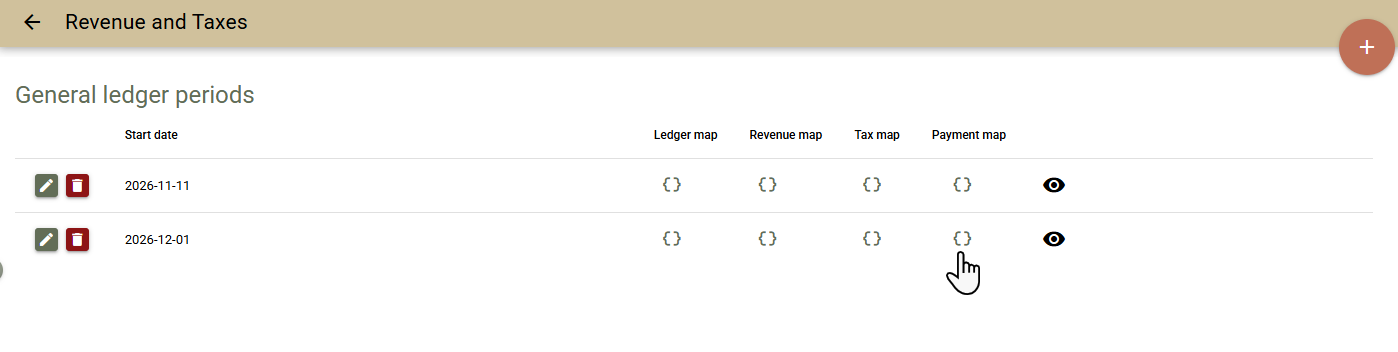
General ledger periods – As part of our ongoing accounting improvements, we have introduced General ledger periods, allowing you to configure GL Codes and cost centres for the various data streams in Clock.
GL Codes for payments previously configured in GL Codes have been moved to the new “General ledger periods” section.
You can update the codes within an existing period or create a new period to preserve historical accounting information.
Example: If the GL Code for cash payments changes from 1111 to 1112 on 1 December, simply create a new General ledger period effective from that date and configure the new set of codes. Reports for dates prior to 1 December will continue to show 1111, while reports from 1 December onwards will use 1112.
- This ensures consistency and accuracy in historical reports when accounting configurations change over time.