
New Features
Kiosk (new)
We've added new functionalities to the Kiosk: Lost card, Room change and Self Checkout. These features are especially useful for hotels without a 24-hour reception, as their purpose is to expand self-service options and allow for the resolution of more cases without the need for on-site staff.
- Lost card. If a guest loses their access card or forgets their room number and there is no staff available, the Kiosk can assist them. Once the guest identifies themselves on the Kiosk, they will see information about the room they are staying in and, if necessary, will be able to issue a new key for it.
- Room change. If a room change is necessary after check-in, for example due to a problem with the current room or an upgrade to a higher category, the guest can get a new key for the new room directly from the Kiosk.
- Self Checkout. On the day of departure, the guest can use the Kiosk to perform self checkout. The functionality includes:
- Checking for unpaid charges, accumulated during the stay;
- Requesting payment of all outstanding charges before finalising the departure;
- Closing the folios;
- Sending the documents by email;
- Marking the booking as checked out.
Marking the booking as checked out provides up-to-date information for the hotel housekeeping scheme and allows the room to be cleaned earlier, which helps to better distribute the workload.
The Self Checkout function via the Kiosk depends on a setting that can be activated from the Kiosk settings screen. When activating, it is also necessary to select the type of document with which to close the guest's folios.
Booking.com
We have made several improvements to the direct integration with Booking.com.
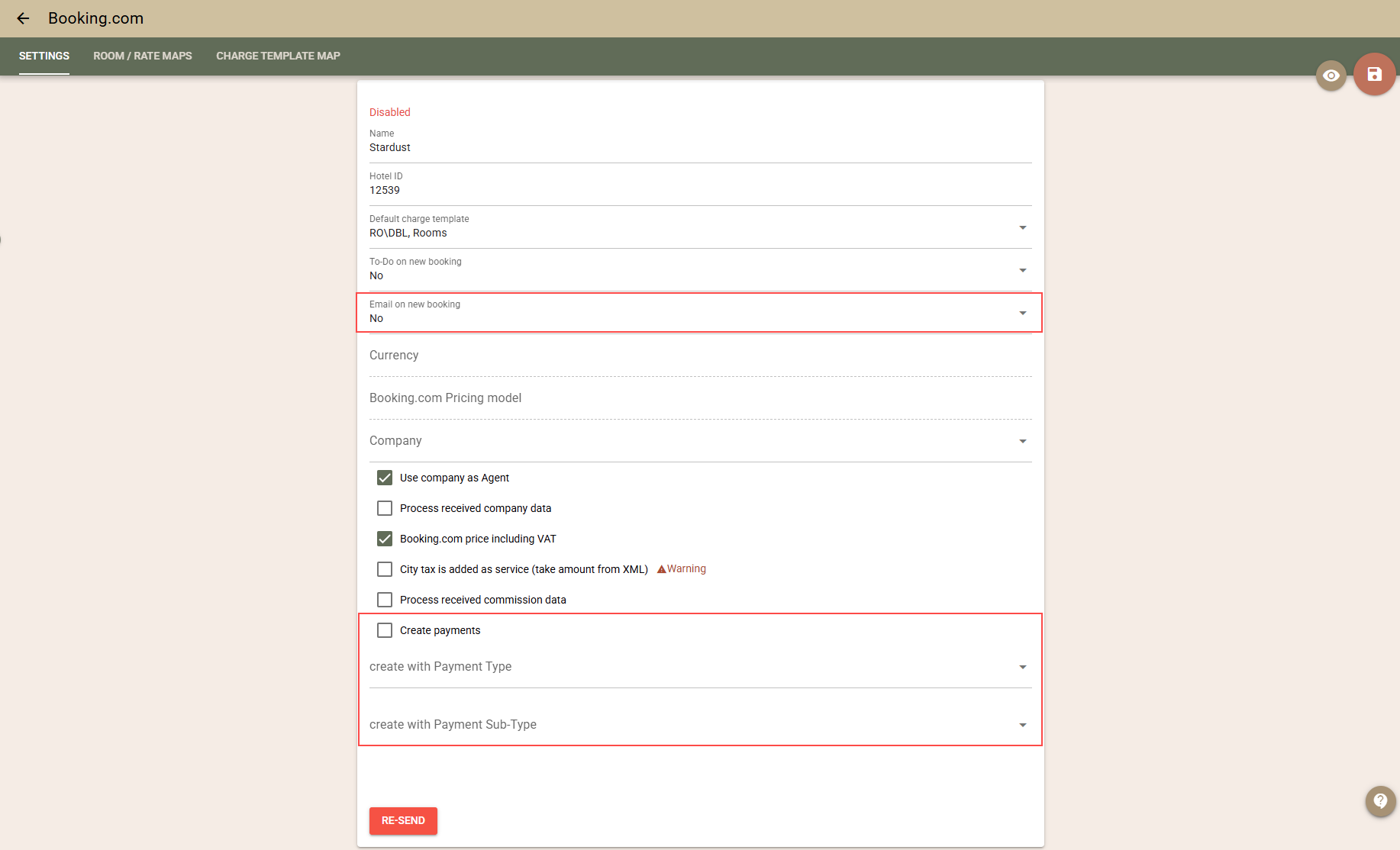
- Import of payments. If you work with Booking.com on a model where Booking pays you the payments received from guests by bank transfer, this functionality can greatly facilitate your work by automating the addition of payments to the folios. When the new payment import setting is activated, when importing a new booking, if the guest has prepaid a certain amount, it will automatically be added as a payment to the booking's folio. More details:
- A new setting for payment import has been added, which is disabled by default. Settings for the type and subtype of automatically created payments are also available.
- The import is performed only when the booking is initially created in Clock. Subsequent updates do not import payments to avoid duplication.
- The amount of the imported payment corresponds to the amount the guest paid and which was sent in the message from Booking.com.
- If the guest books several rooms at once, the payment will be added to the first booking in Clock.
- When initially importing existing bookings (if the setting is enabled), the available payments for them will also be imported.
Important: In certain situations, the initial import of bookings is performed with minimal data, in which case payment information may not be available and will therefore not be imported.
Virtual cards. Can the function be used if Booking.com pays the funds via virtual cards?
Yes, it is possible, but we do not recommend it, as the folios will appear as already paid. This can make your job more difficult because:
- automatic payment collection tasks will not be able to be used (as the folios will already be marked as paid);
- tracking the virtual cards that need to be charged will be more difficult.
- Improvements in the mapping of room types. We have changed the restrictions on the mapping of room types. It is now possible to duplicate the mapping of a room type if it is not exported. This allows, if you use the connection with Booking.com only for importing bookings, to map several room types from Booking.com to one room type in Clock PMS.
- Email notification upon new booking. We have added the ability to receive an email when a new booking is imported from Booking.com. In the Booking.com settings, there is now a new option to send an email notification for each new booking.
Improvements
- Booking – "Re-Route charges". We have added a new button to the booking screen that allows you to re-route (Re-Route charges ) the charges on the booking. The function reviews all charges (automatically or manually added), regardless of which folio they are currently in. Based on the currently active router (by Company, Agent, Event or manually selected in the booking) and the current routing rules, the system determines which folio the charges should be in and transfers them automatically. The following charges are not affected by the function:
- Charges in closed folios;
- Charges belonging to other bookings;
- POS transfers.

Example: You have a rule for routing to a company, according to which all charges, except for City Tax, are transferred to the company folio. Later, you find that the City Tax should also be transferred to the company folio. You edit the router, open the booking and execute the "Re-Route charges" function. As a result, the City Tax charges will be transferred to the company folio.
- Folio prints – merging rows with different VAT. We have added the ability for rows with different VAT rates to be merged in the printouts if they have the same print text.
To enable this behaviour, you need to hide the tax percentage column: Settings → Documents → Folio Printing - defaults enable: "Hide Tax percentage column". Once the column is hidden, rows with the same print text will be merged.
Example: You have a "bed and breakfast" package where the services have different VAT. Until now, they were printed on separate lines. They can now appear as a single line with a total price.
- Rate Packages – items valid for a period. Until now, the items in the rate packages could only be limited by specific dates, which is not convenient for long periods (months or years). We have added the ability to define items through a valid period.
The period can also be "open" – only "from" or only "to" is filled in.
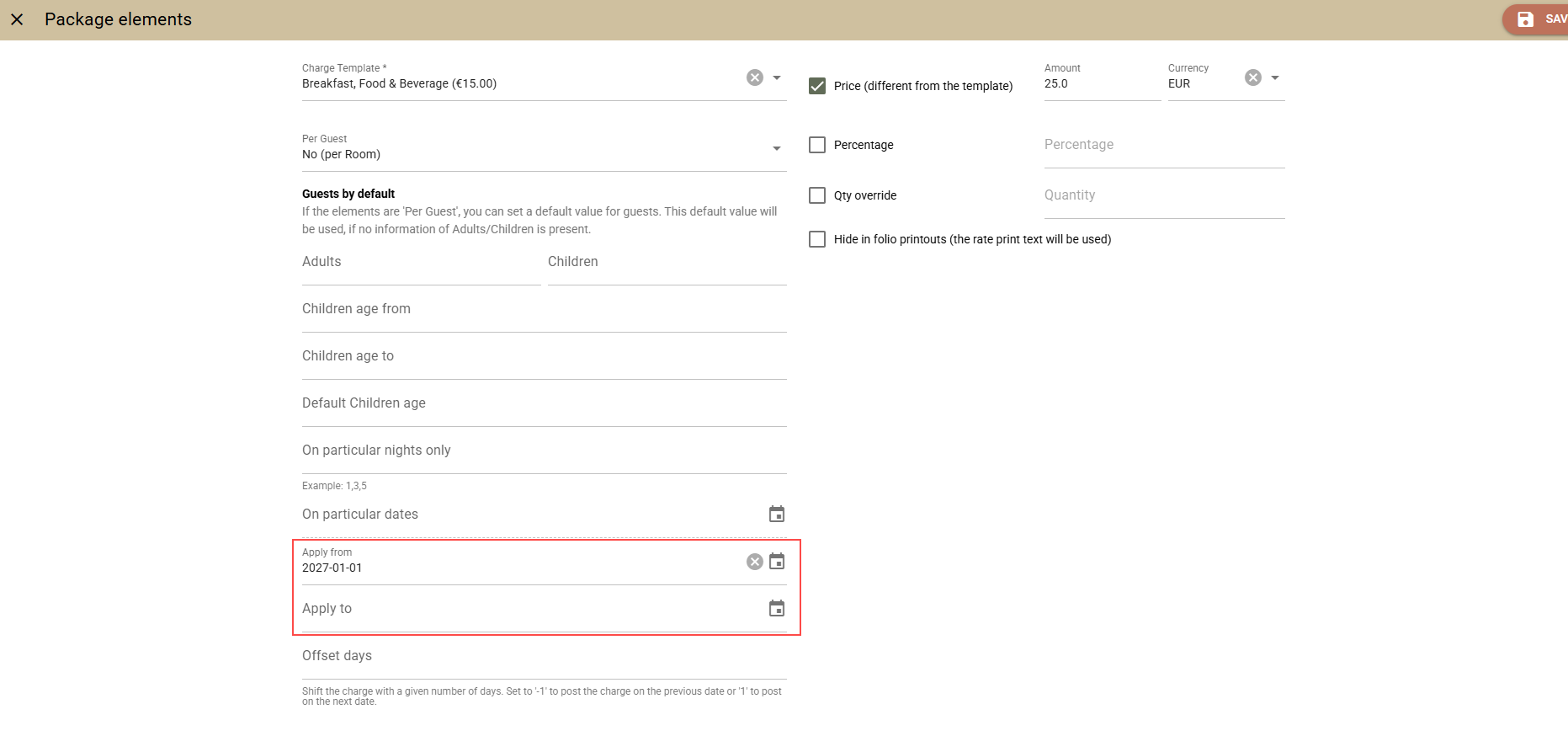
Example: The package may contain:
- Breakfast for 2026 at a price of EUR 20
- Breakfast from 2027 at a price of EUR 25
- Elavon – improved integration stability. We have made a change in the interface with Elavon in order to increase stability and reduce failed transactions. We removed the initial "verifying" transaction, which in certain combinations of payment means and operators could fail for no apparent reason and block the actual payment. Its removal has no negative consequences and we expect significantly more stable behaviour.
- Arrivals/Departures screens – quick date navigation. We have added buttons for quick navigation to the previous/next date in the new Arrivals/Departures screens, without having to select a date from the calendar.
- Booking Enquiry – personalised text in the offer email. In the new booking enquiry screen, we have restored the ability (available in the old screen) to add personalised text to the offer email. The Header and Footer fields are displayed respectively before and after the main text of the offer.
- Availpro – booking agent. Previously, if the submitted agent did not have an IATA number, it was not imported and the booking remained without an agent. We have changed the logic so that in the absence of an IATA number, the system uses the agent specified in the company mapping.
Fixes
- Events – Rooming list. The created bookings now inherit the marketing segments according to the standard logic (Rate→ Company→ Agent→ Event), as in the other screens (e.g. Rate and Availability).
- Sorting of rates. We have fixed an issue where changes in the rate sorting screen could not be saved if there were archived rate plans.
- RoomCloud – Export Log. The "RoomCloud room" and "RoomCloud rate" columns now show not only the ID, but also the name of the room/rate.
- Search for events. We have added the PAX field in the event search screens, where it was missing.
- Rate and Availability(new). We have fixed an issue where bookings could not be created in combination: with a company, without guest details and with reference numbers.
- Booking enquiries – email template: We have fixed an issue where two parameters were not displayed in the email template: booking_offer_item.arrival_bookable.t_name, booking_offer_item.arrival_bookable.t_description
- OTA / SiteMinder – Export Log. We have corrected the filter by room type, which did not work when selecting a virtual room type. In addition, the room type code is now displayed when mapping to virtual room types.
- POS – Promotions. We have fixed an issue where after deleting a charge template used in a promotion, the promotion could no longer be edited.
Integrations
- PEPPOL e-Invoicing (gateway: billit.eu). The rebuild feature logic has been improved.
- Italian Invoice Export. To avoid rounding differences (especially for Tax mode Tax not included in prices, rounding – total) between the document lines and total, tax rounding difference charges have now been added to the document lines to match the sum of all changes and total amounts for the documents.
- Mailing list. The +Add guest option has been optimised for better usability and now works faster
- Gastronovi POS integration. The End Of Day function is now optional and you can use hotel transfer on its own if you don't need consolidated reporting.
- Romanian e-Factura. The bank accounts configured as Payment Means can now be configured to be added to all folios regardless of their balance. The Current behaviour is to add them only to the folios with an outstanding balance. The behaviour can be changed using ROMANIA - e-Invoicing / RO eFactura export Settings from the AppConnector menu
- Standard Sweden Accounting Export (SIE4). A Standard SIE export option has been added to the AppConnector. More information about how it can be configured and used is available in the support article "Standard Sweden Accounting Export (SIE4)"
- Atomize integration. We have added the ability to open a new Atomize account for those of you who already have one. The feature should be used with caution and after the advice of Atomise as it should be followed by the new Atomize onboarding process.
- Clock API
- We added the number of adults and children to the occupancy_forecasts endpoint. More information is available in the relevant API documentation.
- Rooms and room_types endpoints now provide information of the components for the virtual rooms / room types. More information is available in the relevant API documentation.