
New Functionalities
Rate and Availability – Updated Screen
We've launched a new and significantly improved version of the "Rate and Availability" screen, making it easier to work with bookings and providing better visibility of prices, availability and related information.
Key improvements and new features:
- "Cart" – room bookings, activity bookings and total price;
- Additional services for bookings;
- Automatic or manual mode for rate selection;
- Manual price;
- Selection of Profile, Company, Event or Block and transfer of information to the booking;
- Improved block booking, including optional blocks;
- Selection of one or more room numbers;
- Multiple information views and interactive filters;
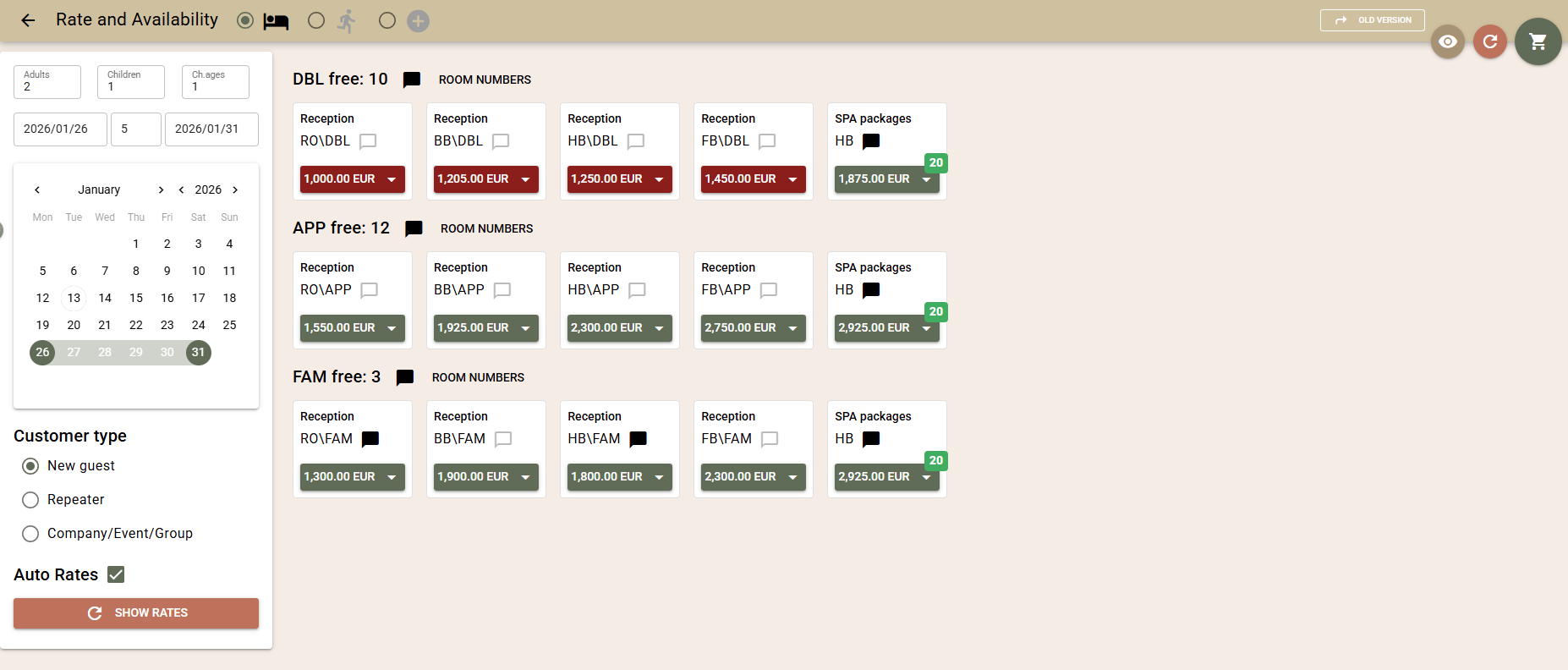
Booking cart (rooms, activities, and services)
The screen now works with a cart that allows you to add:
- room bookings with different numbers of guests, room types, rates, blocks and periods;
- activity bookings;
- additional services to rooms and activities.
The following is visible in the cart:
- the price of each product;
- the total amount;
- the total amount of the required deposit.
The calculation includes all applicable elements – Tax regime, City Tax regime, Markups, Automatic charges to bookings related to room types, as well as added Additional services.
Once the cart is complete, you can:
- create bookings directly;
- or save it as a Booking Enquiry.
When saving as an enquiry, activity bookings are not supported and are excluded with a warning message.
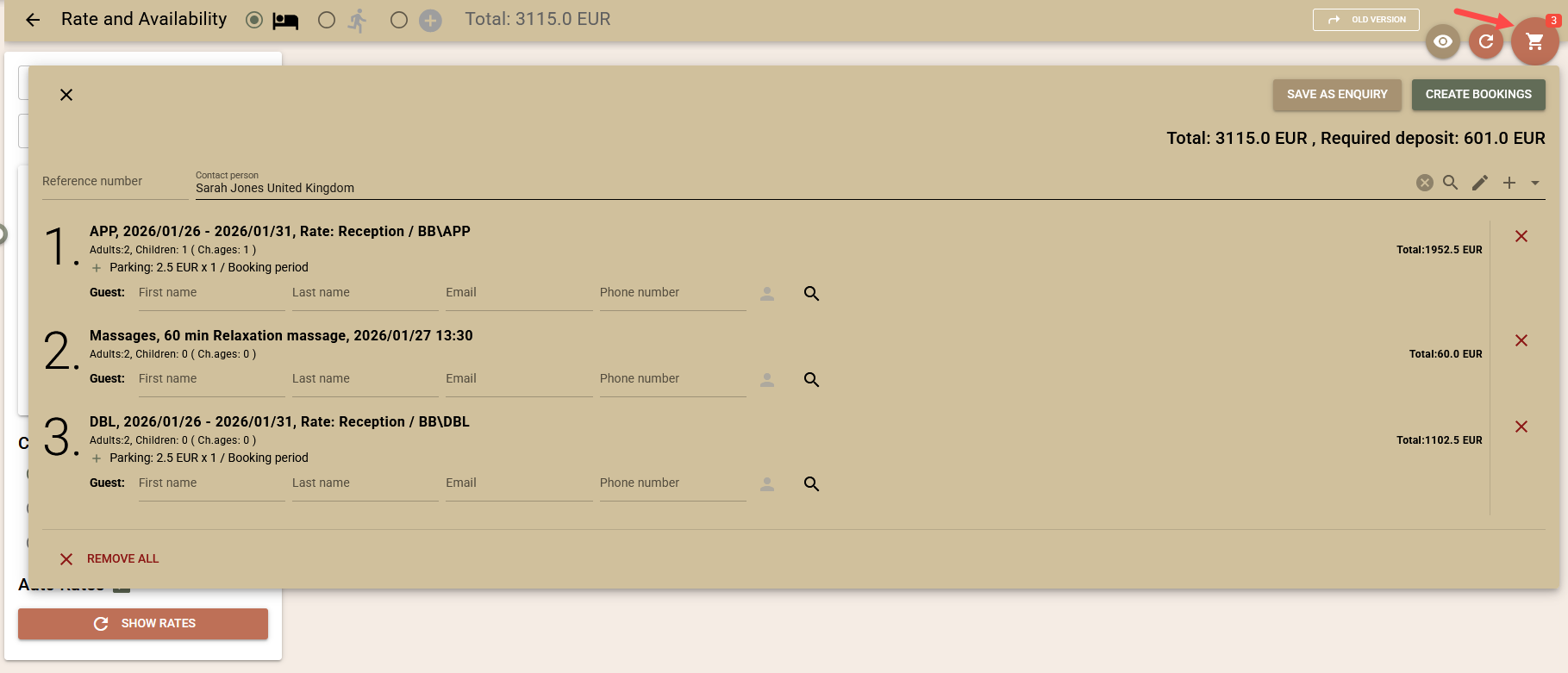
From the radio buttons to the screen title, you can choose what you are booking: Rooms, Activities or Additional Services.
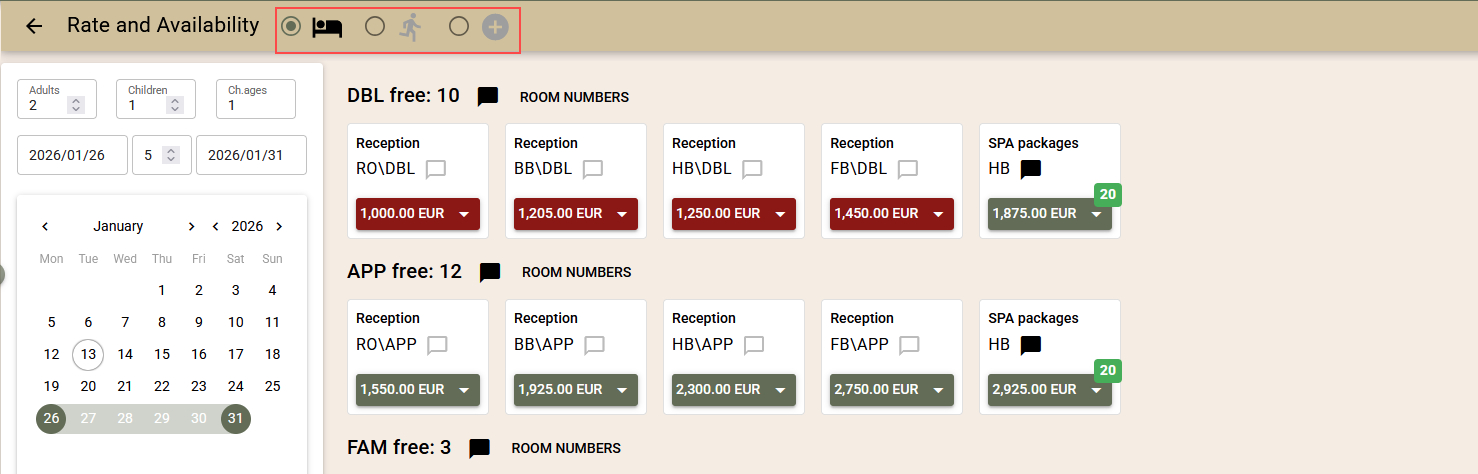
Activity Bookings
Bookings are supported for activities, introduced with the previous update, as the first part of the new "Rate and Availability" screen.
Manual Price
If you have the appropriate user rights, you can enter a manual price for a selected rate.
The system offers standard calculated daily prices, which can be edited.
The manual prices entered are correctly reflected in the cart and transferred to the enquiry or booking.
Additional Services for Bookings
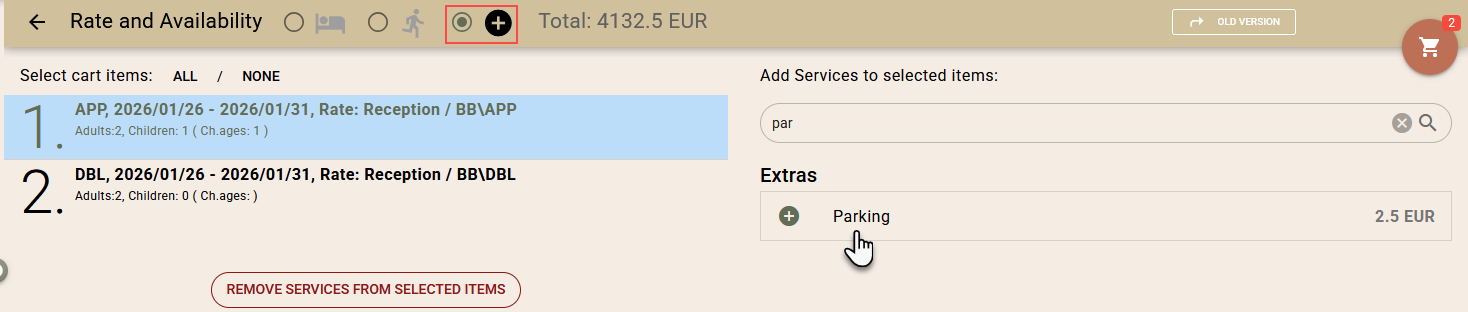
After adding rooms or activities to the cart, additional services (e.g. dinner, parking, cot) can be added even before the booking is created. When saving as an enquiry, the selected services are transferred to the final booking.
For services with limited daily capacity, the system shows:
- availability by day;
- visual indication of insufficient availability.
Additional services can be applied for:
- the entire period;
- the arrival date;
- the departure date;
- specifically selected dates.
All services are included in the total amount of the cart.
Automatic and Manual Rate Selection Mode
Automatic Mode
The system automatically selects appropriate rates according to the client type:
- Individual / Returning guest – preferred rates;
- Company / Event – rates from the Company agreement, if not available – preferred rates;
- Block – the rate or manual price from the block, if not available – the Company agreement, then preferred rates.
Manual Mode
It is possible to select rates:
- by rate plans;
- by rate tags.
For both modes, searching is available, as well as saving the selected plans or tags for future use (locally for the station).
Selection of Profile, Company, Event or Block
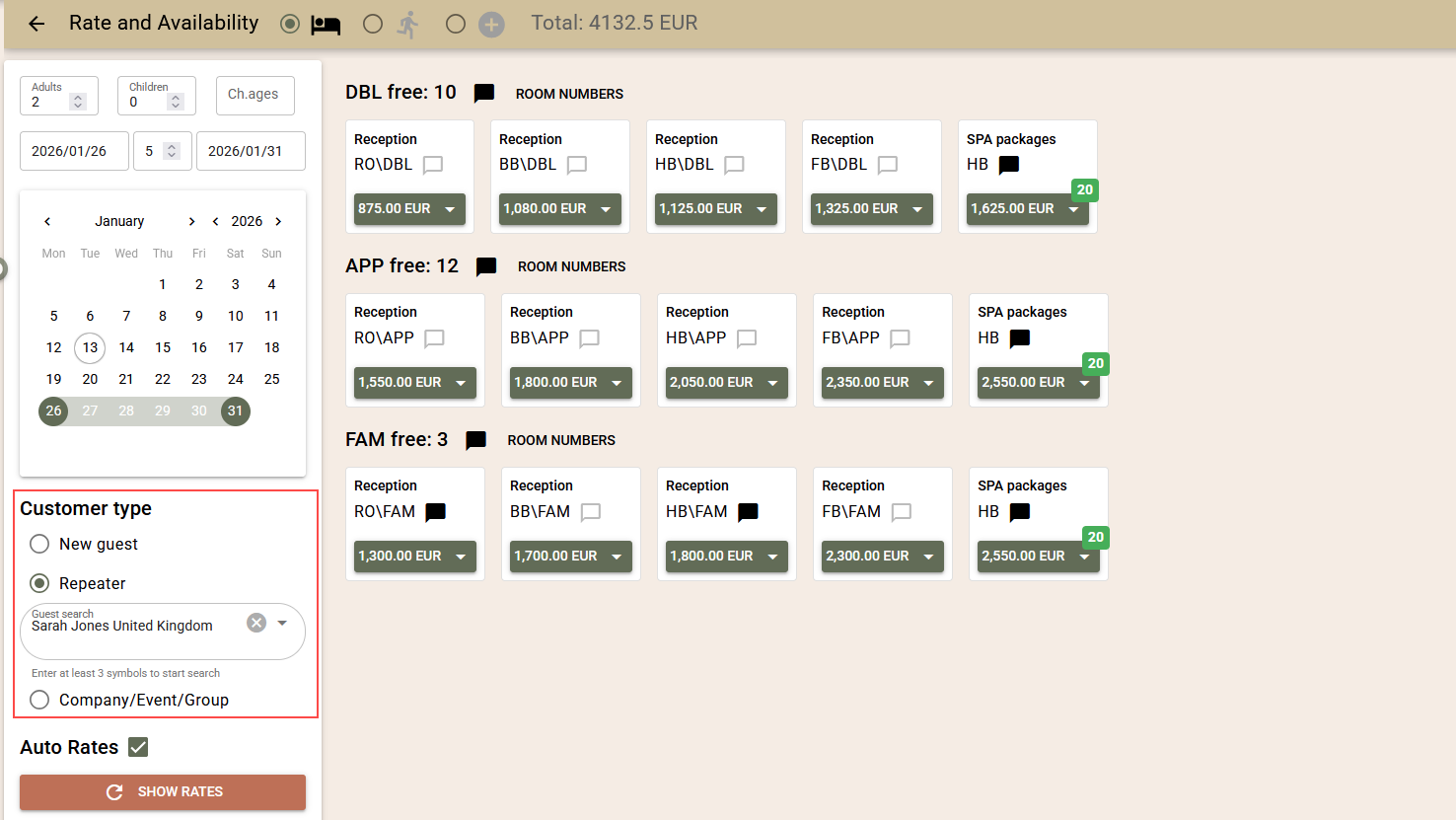
The client type can be selected in advance, which helps automatic rate selection and the transfer of information to bookings.
Supported:
- selection of contact profiles as a guest, for Company / Event / Block;
- choosing whether the returning guest is a contact person or a guest;
- selection of an existing profile even for an individual guest;
- pre-entering data for new guests.
Automatically transferred:
- Guarantee policy and meals from the rate;
- Reference number (manually entered or automatically generated);
- Marketing segments (priority Event → Company → Agent → Rate);
- Colour for the calendar and Client cost centre from the Event.
Improved Block Booking
- Blocks are selected directly by period, Company and Event (without a code);
- Optional blocks are supported;
- Availability is the minimum value between the block and the hotel availability;
- Blocks without pre-set rates or manual prices are supported.
Selection of Specific Room Numbers
In addition to room types, it is now possible to check and select specific available numbers before creating the booking or enquiry.
Views and Interactive Filters
Several views are available:
- List - each rate on a separate line;
- Boxes - compact view;
- Columns - suitable for unified rate names (RO, BB, HB, etc.);
- Calendar - detailed overview by day.
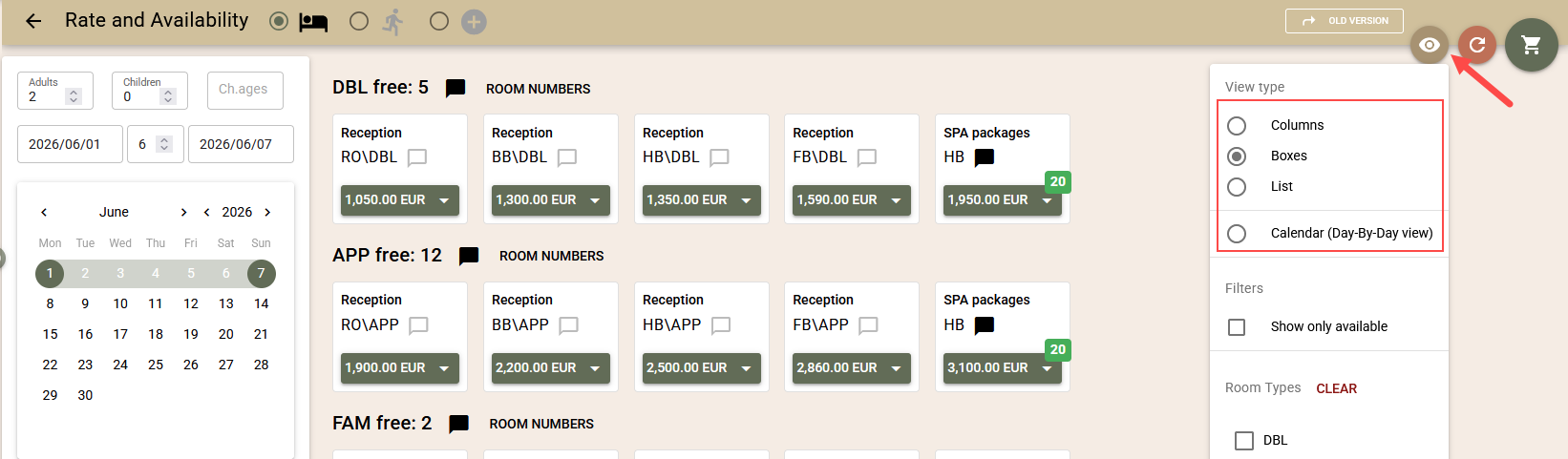
The last selected view is saved for the device.
The filters for room types and "only available" work instantly, without reloading.
Additional Improvements
- Descriptions for staff for room type, rate and guarantee policy;
- Adding one or more room bookings with one click;
- Visibility of activated restrictions;
- Tracking the booking creation process and the ability to "Retry" in case of a removable error;
- Significantly improved performance – up to 2 times for few rates and up to 4 times for many rates;
- Support for limited capacity packages.
Detailed Instructions
For a detailed description of how to work with the new "Rate and Availability" screen, see the following articles:
"Rate and Availability" Screen: Creating Bookings
"Rate and Availability" Screen: Additional Services
"Rate and Availability" Screen: Advanced Features
Rules for Automatic booking charge routing
A new functionality has been added for automatic booking charge routing through predefined rules, which eliminates the need for manual transfers between folios.
What problems does it solve:
- Removes manual processing of charges for corporate, group and event bookings;
- Reduces errors in complex payment and invoicing agreements;
- Facilitates the management of scenarios with different payers and deferred payments;
What it is:
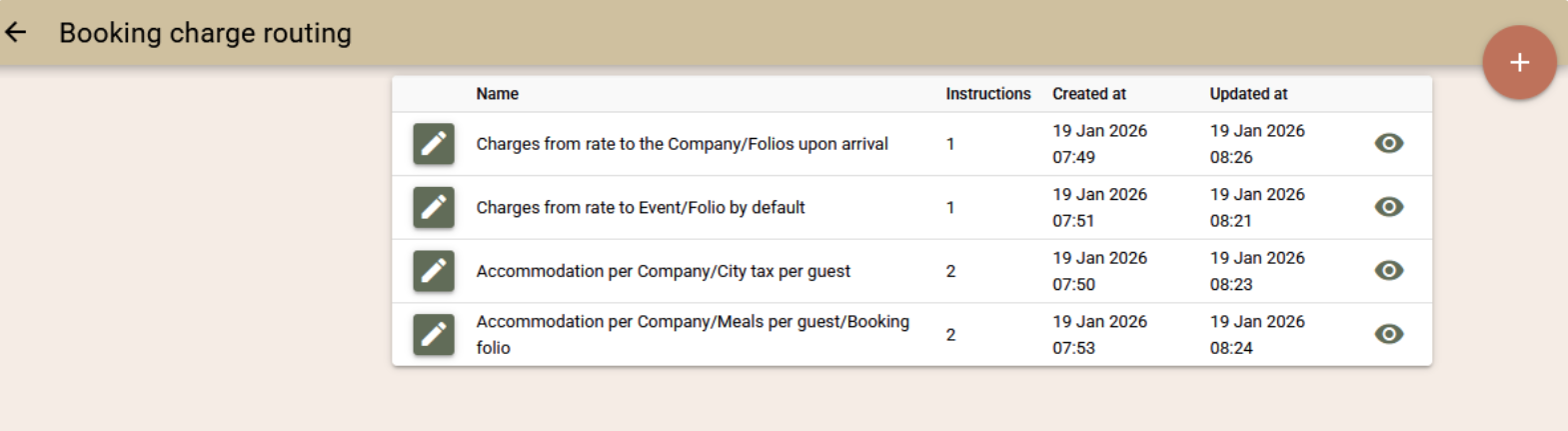
- Configurable set of rules for automatic charge routing;
- Determines who pays a specific charge and in which folio it is reflected;
- Applied automatically to all related bookings after a one-off setup.
What it allows:
- Distribution of charges between Guest, Company, Agent or Event;
- Routing of charges to specific folios at the time of charging;
Automatic split or grouping of invoices according to the agreements;
Support for on-site payment and deferred payment.
How it works:
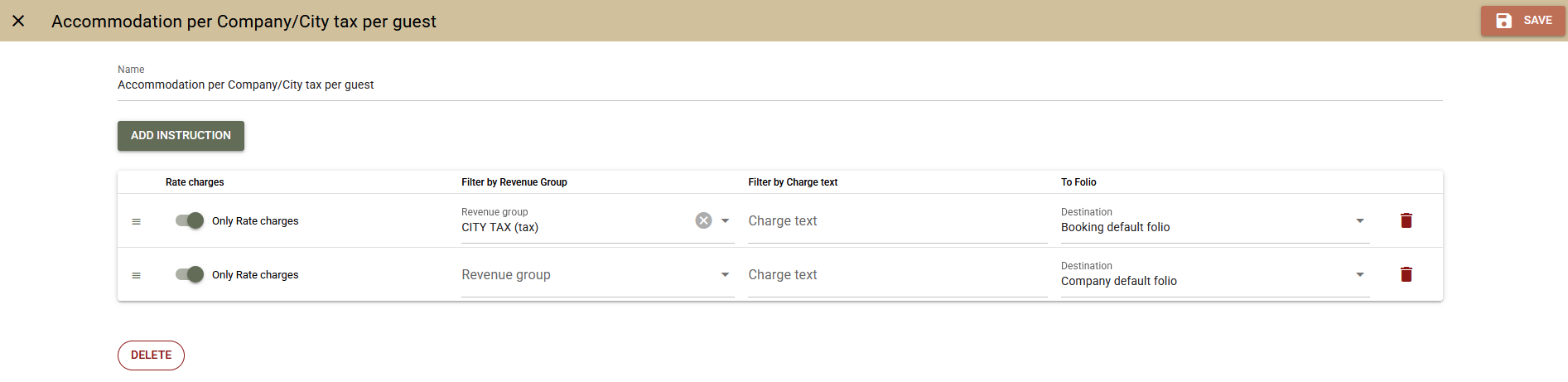
- Rules are created that determine who pays and in which folio the charges go;
- The router is selected at the Company, Agent or Event level;
- All related bookings use the router automatically, without the need for manual actions;
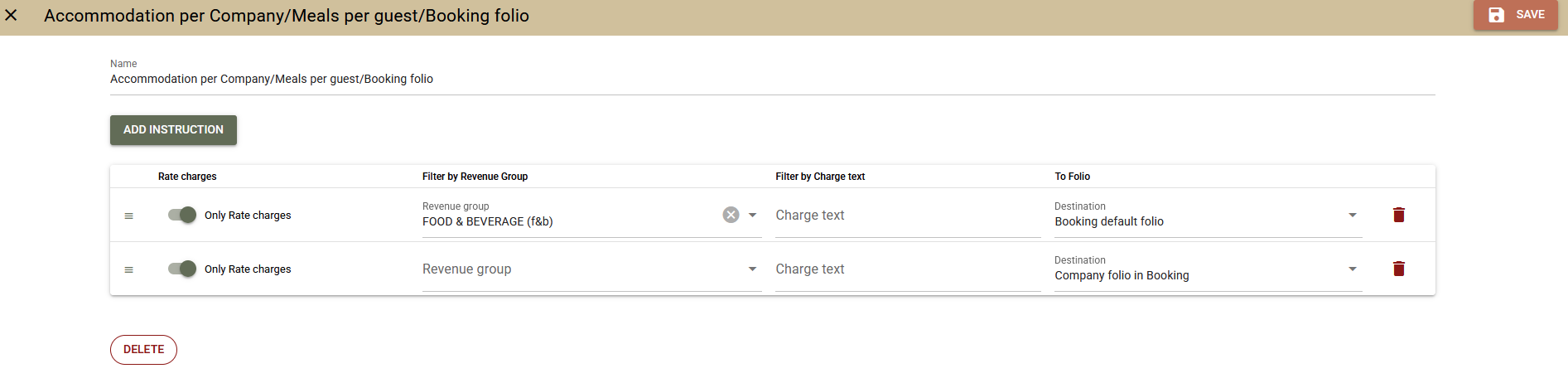
What charges are routed:
- Automatic charges (rates, packages, daily charges, City Tax);
- Manual charges per booking;
- Transfers from POS to room.
Supported scenarios include:
- The company pays for the package, the guest – for the additional services;
- The guest pays, but the invoice is in the name of the company;
- Separating a package and additional services into different folios;
- The company pays for the accommodation, but not for the meals, even when they are part of a package;
- Many other combined scenarios with Event, Company, Agent and Guest.
Important:
- Routing is applied only at the time of charging;
- Already made charges are not moved automatically;
- Charges added directly to a folio are not routed.
For more details on the settings, logic and use of the new functionality, see our detailed articles:
Rules for automatic routing of booking charges
Improvements
Booking Enquiry
We have added new screens for Booking Enquiry – search and edit. These are accessible from the navigation (the "New" button) and from the new "Rate and Availability" screen. The existing functionality has been retained and enhanced with the following improvements:
- Ability to add additional services to the room in the enquiry;
- Ability to link the rooms in the enquiry to a Company, Agent or Event.
Additional services added to rooms via the new "Rate and Availability" screen are now also saved in the corresponding room of the enquiry. They are visible in the enquiry screen and are automatically transferred when a booking is created – both from the WBE and directly from the enquiry screen.
Similarly, the Company, Agent or Event selected in the "Rate and Availability" screen is saved to the room in the enquiry, displayed in the screen and transferred to the created booking.
These improvements make Booking Enquiries a more complete and convenient tool for working with both individual and corporate guests.
Other Improvements
- Booking.com – increased number of mappings. If you are using both Booking.com and another channel manager, we have increased the number of rate mappings available. 100 separate mappings have been added, reserved specifically for Booking.com, so its settings are not limited by the mappings used for other channels and vice versa.
- Activities – deleting time slots. It is now possible to delete a time slot for activities, even if it has been used in existing bookings. Deletion does not change existing bookings, their times or associated capacities, which remain active. This provides greater flexibility in managing and changing time slots.
- "Payments" Report – Petty Cash. A separate total for petty cash payments has been added to the report for clearer and more detailed reporting.
- Switching to the new booking search screens. The new booking search screens are now active by default, including: Arrivals, In Hotel, Departures, Advanced Search.
- Closings – support for longer periods.The user or day closing functionality is designed for daily reporting. In practice, however, there may be a longer period between two closings (for example, when closings have not been used for a long time or are being activated for the first time). In such cases, a large number of folios, charges and payments accumulate in the period, which may make it difficult or even block the generation of a report. The behaviour of closings has been improved so that the system can handle long periods:
- Period from 1 to 7 days – the closing contains a full and detailed report, as before;
- Period from 7 to 30 days – the closing contains a summary report with payment totals, without a detailed breakdown;
- Period over 30 days – the closing contains no data and is considered the beginning of a new reporting period. The next closing will contain the full report;
- Initial Closing – for new accounts, it is advisable to make an initial closing after setting up the system and before actual operation to start reporting correctly.
- WBE link builder. Added the ability to create links to specific activities. This allows for better integration of WBE with your website – for example, the booking buttons on the site can lead directly to a selected activity instead of the general list of activities.
- The starting work screen. Errors from Booking.com and SynXis are now displayed in the "Channel Managers" section of the start screen.
Fixes
- Guest Portal – the room type in the details bar is now translated correctly;
- Email Verification – corrected the incorrect message when there is a mismatch between the verified email and the email entered as username in custom SMTP
- Printing Documents – printing cancelled documents no longer increases the printed number;
- Surcharge in Folio – corrected the incorrect calculation for a specific combination of calculation method, discounts and available charges;
- "Rate and Availability" screen: – corrected the reporting of free rooms when virtual room types are blocked;
- Deposit Ledger – fixed an issue where a small unallocated amount remained when the advance and final folios had different currencies, due to currency differences;
- Company Overview Screen – consumed and cancelled folios are no longer displayed in the list of deposit folios;
- WBE – the Event Code entry screen now opens correctly in the selected language;
- Booking Advanced Search – corrected the key card issue times, and the time zone is now correctly taken into account.
Integrations
- Gastronovi
- Mapping Optimisation - the process of creating and maintaining mappings between Gastronovi and Clock has been optimised;
- Non-room booking support - support for Non-room bookings has been added. For easier recognition in the Gastronovi interface, these bookings are submitted with room "NON-ROOM booking".
- PEPPOL e-Invoicing (gateway: billit.eu)
- Added Client Data - the set of client data exported to PEPPOL has been expanded, and now includes: Address, City, ZIP Code, Country Code;
- Improved Receiver ID Validation - the validation of the receiver identifier has been improved. Validation now works correctly even when using separators, for example: 123 456 789, 123.456.789;
- Receiver ID from Company Custom Field - the ability to select the Receiver ID field from a Company Custom Field, and not just from the standard Company fields, has been added.
- API Key Check on Activation - a check of the configured API Key has been added when saving settings with Active enabled. If the key is invalid, the system will return an error "StandardError: ApiKeyNotValid". The aim is to prevent the saving of an invalid API Key, which would prevent the sending of documents to the PEPPOL network.
Localisations
- RO e-Factura
- Export in Compact View - the ability to export documents in a compact view has been added. A new XML Generation option is available in the interface settings, which works as follows:
- Compact mode disabled – charges are exported in detail, as before;
- Compact mode enabled – charges are grouped analogously to the Compact view of the folios:
- grouping by tax rate (tax %) and print_text;
- if print_text is missing, the text field is used;
- the quantity (qty) field is always submitted with a value of 1, as required by e-Factura;
- Different InvoiceTypeCode for fiscalised documents - documents containing payments subject to fiscalisation are now exported to e-Factura with InvoiceTypeCode = 751 (instead of 380). We remind you to check the settings for fiscalised payments in Settings → All Settings → Romanian Fiscal Policy → Fiscal Payment Types.
- Export in Compact View - the ability to export documents in a compact view has been added. A new XML Generation option is available in the interface settings, which works as follows:
- Italian Invoice Export
- Change in the content of the <RiferimentoTesto> element - the <RiferimentoTesto> field has a limit of 60 characters. With the previous method of filling in the field, it was possible for the booking reference number to exceed the allowed length. With this change, the content of the field is now exported in the following standardised format: Jul 31 - Aug 01 2025 / BOK.13456789 / APP, Daniel Wood, where:
- BOK.13456789 is the reference number of the booking;
- if a reference number is missing, the booking number is used (for example, Booking #362).
- Change in the content of the <RiferimentoTesto> element - the <RiferimentoTesto> field has a limit of 60 characters. With the previous method of filling in the field, it was possible for the booking reference number to exceed the allowed length. With this change, the content of the field is now exported in the following standardised format: Jul 31 - Aug 01 2025 / BOK.13456789 / APP, Daniel Wood, where: