
Improvements
Tour Operator Contracts
- Holiday packages and different prices for different children's ages.We have added a new filter to holiday packages – minimum child age / maximum child age (the filter is “inclusive” – it includes both values). This allows you to define the same holiday package (for example, New Year) with different prices and services depending on the children's ages. For greater flexibility, the filter uses the children's actual ages instead of age groups. This means that:
- The price breakdown for children can be more detailed than the breakdown by age groups. For example, if you have two age groups – up to 4 and up to 16 years old – for holiday package pricing you can use an age filter with more steps – such as 0–2, 3–6, 7–12, 13–16. In other words, you can have 4 different prices for the holiday package.
- The opposite is also possible. If you have two groups, but the package price is the same, you can add a single package with a 3–16 filter.
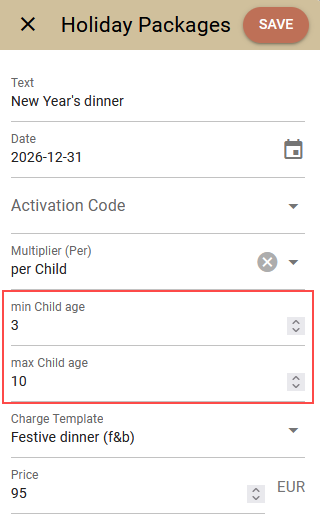
An important point regarding young people! The age filter for holiday packages applies only to guests who fall within the children’s age groups defined in the contract. For example, if the last age group is up to 16 years old, guests aged 17 and 18 are considered adults and the 17–18 filter will not apply to them. To set a special price for the holiday package for 17–18-year-olds, you must add the relevant children’s age group and define prices for it in the other sections of the contract as well.
- Easier pricing for apartments. We have made changes that significantly simplify apartment pricing. Here is a practical scenario: a two-bedroom apartment with a sofa bed that accommodates a maximum of 6 guests. Its price for up to 4 guests is 200 euros, for an additional adult – 30 euros, and for an additional child – 20 euros.
- Add a Base position for the apartment with a price per “ROOM” – 200 euros.
- In the Specific Accommodations table, add the following rows:
- Apartment, guest in order: 5, age group: Adults, Additional price: 30 euros.
- Apartment, guest in order: 6, age group: Adults, Additional price: 30 euros.
- Apartment, guest in order: 5, age group: Children, Additional price: 20 euros.
- Apartment, guest in order: 6, age group: Children, Additional price: 20 euros.
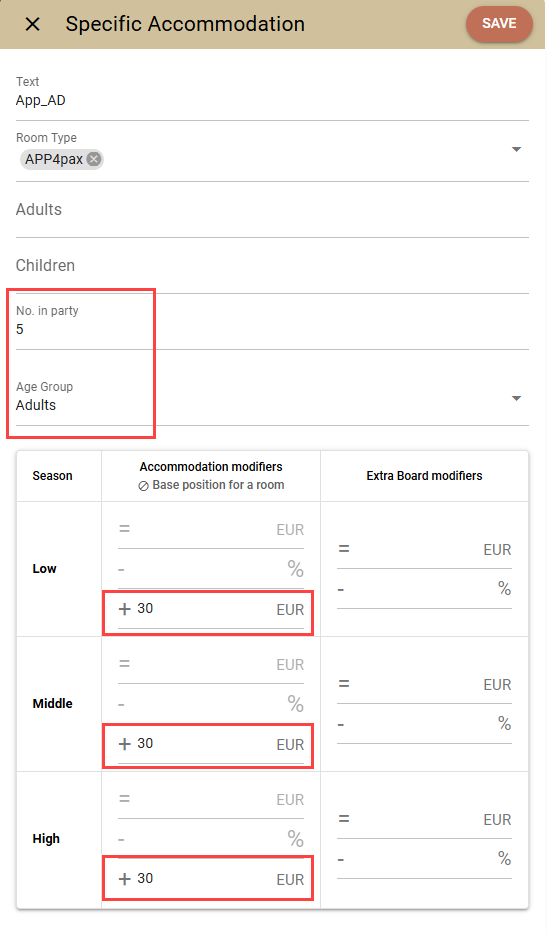
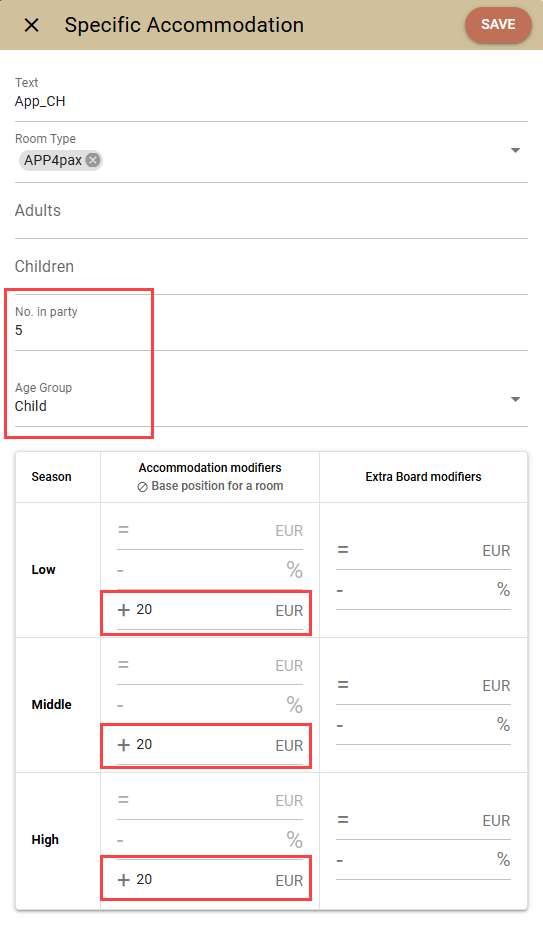
- What has changed?
- We have changed the logic so that using the “Adults + Children” filter is not mandatory. Thus, in this scenario, only the guest order number and age group are taken into account.
- We have added a new field “Additional price”, marked with “+” on the screen. This price is added to the currently calculated prices, or to the room price when priced per “ROOM”.
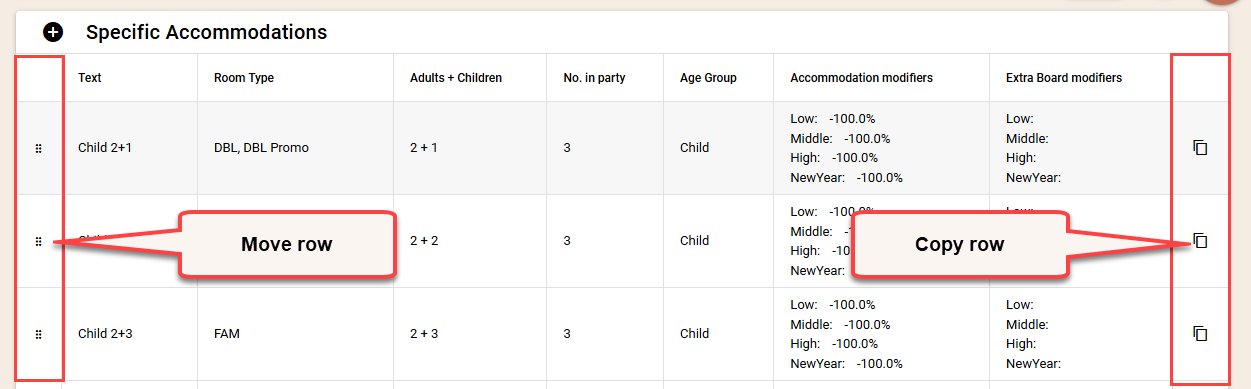
- Reordering contract rows. Contracts with many terms and discounts become quite long. Reviewing and auditing them is particularly difficult because newly added rows appear at the bottom of the table, which “splits up” logically related conditions. You now have the ability to reorder the rows of your contract so that logically related conditions sit next to each other. Better contract readability will save time and reduce the number of errors made.
- Copying contract rows. You can now use the copy function for all rows in the contract. Click the button at the end of each row to open a screen for adding a row, pre-filled with the values you copied. Modify the values on the screen and confirm or cancel adding it.
- Easier work with activation codes. Activation codes for packages and discounts can now be checked and edited much more easily for multiple bookings. Here is where they have been added:
- Bookings - Advanced Search. A new column with the activation codes has been added. This makes it easier to review bookings and spot errors.

- Bookings - Edit multiple.From this screen, you can now edit multiple bookings and set their codes. You can also use quick fill (the lightning bolt button) to set the codes for many bookings at once.

- In the "Company Booking Charges by Folios" and "Company Booking Charges by Reference" reports, you can now see the codes for each booking.
- Bookings – Change log. Changes to the codes for each booking are now visible in the change log.
- Bookings - Advanced Search. A new column with the activation codes has been added. This makes it easier to review bookings and spot errors.
Folios – PDF
PDF files are the better solution for transferring electronic documents and sending them to partners and guests. We have added functionality to generate a PDF based on the current view of the folio. To use this functionality, you do not need to set up or create new templates. Here is what is new:
- The document PDF can be attached to the automatic email sent upon folio closure. If you are not using this feature yet, here is a brief explanation. When any folio is closed, if the folio recipient (company or guest) has an email address entered, the system can automatically send an email using a template. What is new is that a PDF of the document can be attached to the email. You can find the settings for automatic sending, the email template to be used, and the option to attach the PDF file on the Settings–>Documents–>Auto send folio email with folio closure screen.
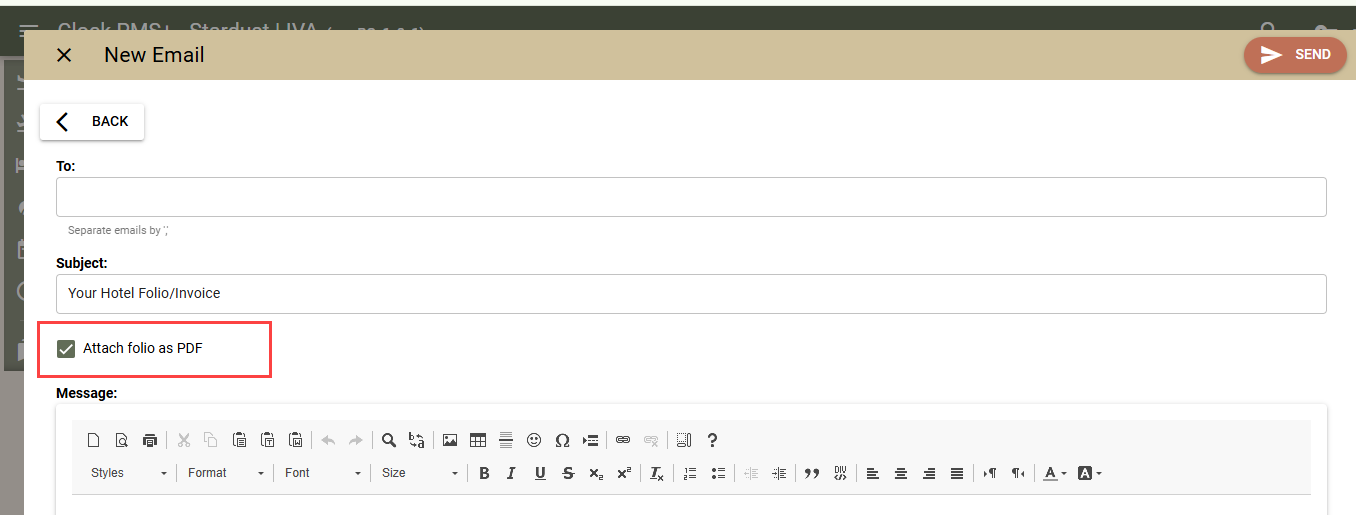
- You can also attach the document PDF when sending an email manually. When sending an email related to a folio (via the envelope button at the top left), on the email content screen you can tick the “Attach folio as PDF”checkbox to automatically attach the folio to the email.
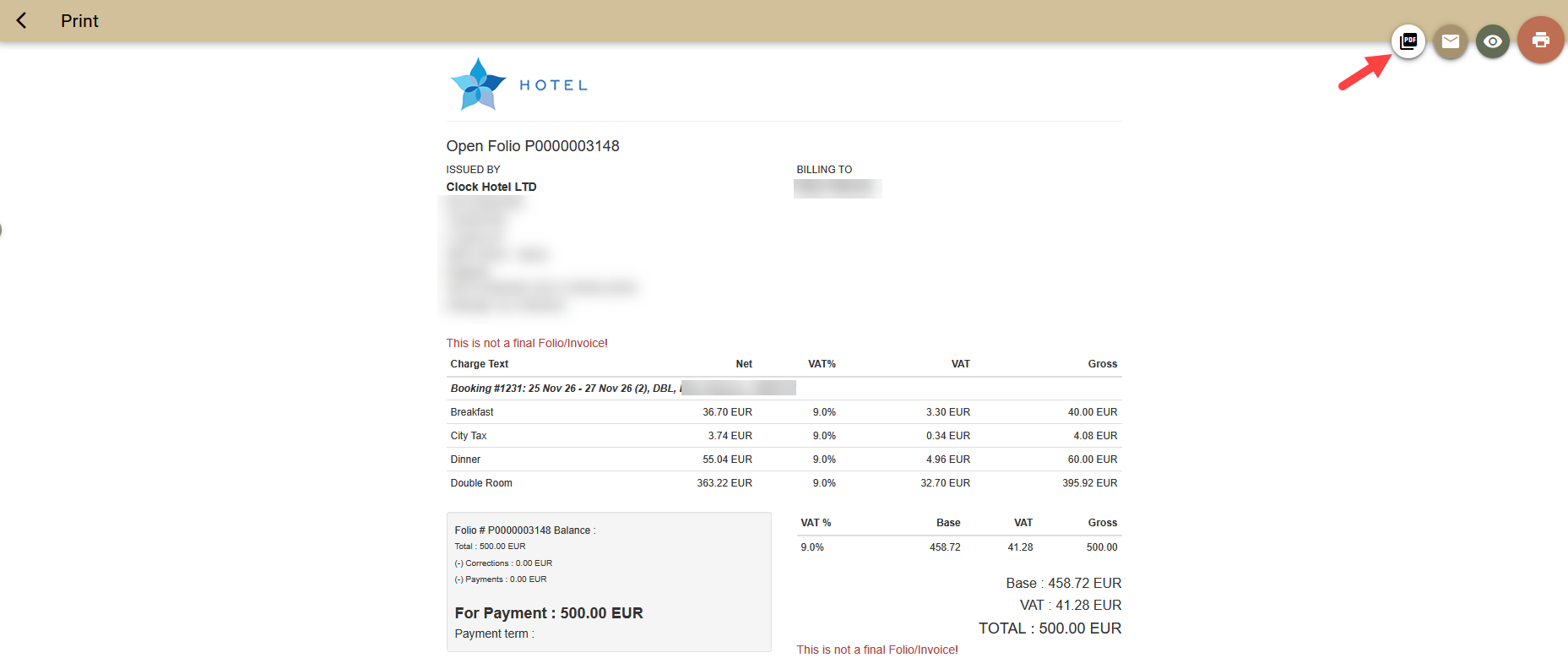
- Downloading the PDF file. If you want to send the PDF file in another way or save it, you can download it via the “PDF” button located on the folio print screen.
- For customers with the German Fiscal Policy, the PDF file is in the format required by the e-invoicing regulation – Factur-X / ZUGFeRD. You can read more information about this below.
Other improvements
- We have added a change log to the Guarantee Policy and Cancellation Policy, allowing you to check in detail who made changes to them, when, and what those changes were.
- OTA – Booking import. When a channel makes several edits to bookings close together in time, messages sometimes arrive in reverse order – the newer one arrives first, followed by the older one. This leads to incorrect (old) data in the booking. We have improved the process so that updates are ignored if they are found to be older than the last processed update. For this purpose, the LastModifyDateTime from the XML message is tracked. If you still find it necessary, you can import the update manually.
Fixes
- Company folios – all pre-authorisations for the respective company were visible, including those made from other accounts. Now only the pre-authorisations made in the current account are visible.
- SixPayments – when paying with a card that was not tokenised, a “Token registration failed” message appeared, even though there was actually no problem with the payment. This led to confusion among users regarding the status of the transaction.
Integrations
- AppConnector
- New look and feel: AppConnector has been redesigned with a fresh, more user-friendly interface.
- API Usage Statistics: You can now monitor the API resources consumed by each of your active integrations and track your total consumption against the monthly limit included in your contract. To access the statistics, navigate to Settings > AppConnectorand click the usage gauge icon in the bottom-right corner.
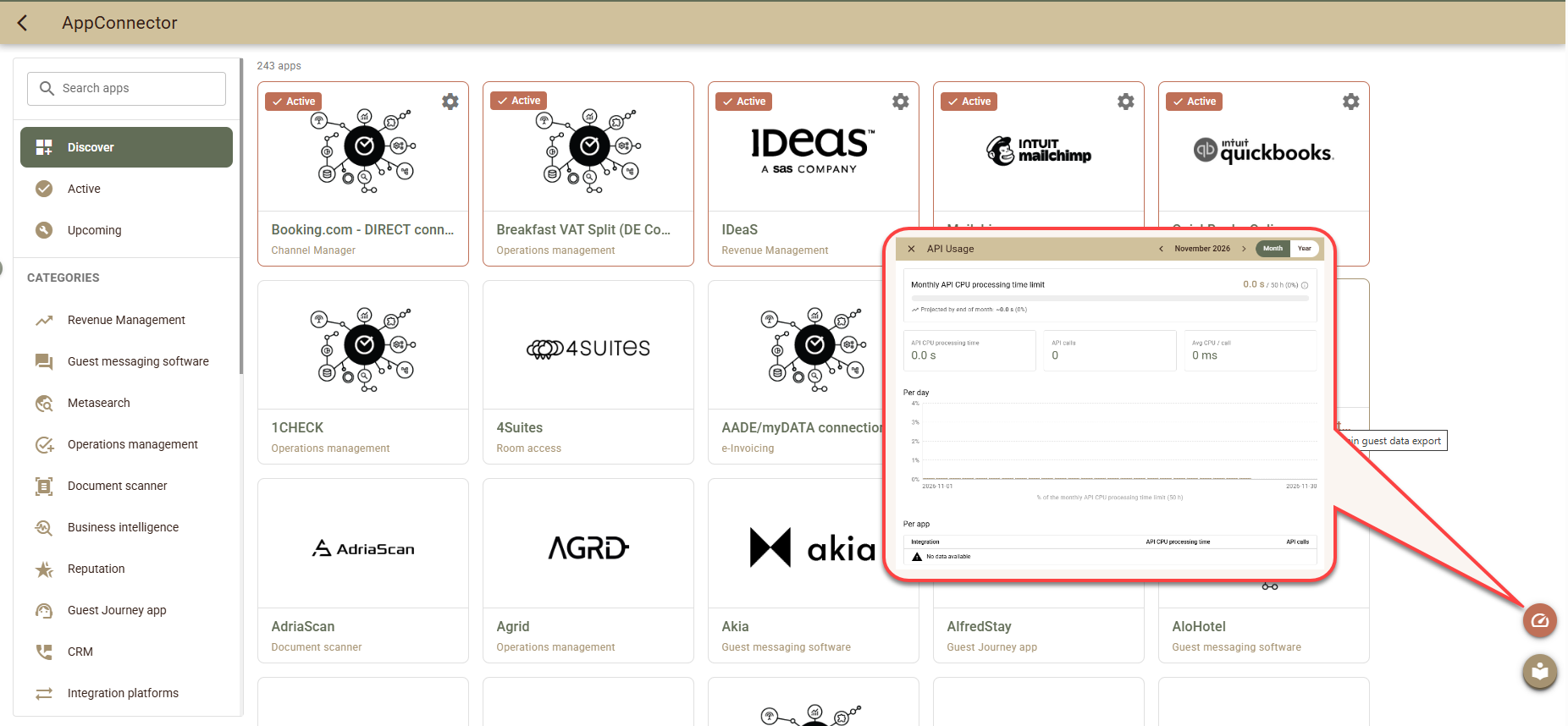
- API Usage Notifications: Automatic email notifications are sent to the subscription owner's email address when API CPU processing time consumption reaches 80% and 100% of the monthly limit.
- Private API Users. In preparation for the upcoming functionality that will allow you to create your own private API users for Clock PMS and POS accounts, we have redesigned the API Users screen (Settings > All Settings > API Users).
The list now displays only API users that are not associated with AppConnector integrations and are intended for your own custom integrations and projects. - Lightspeed POS K Series. Fixed an issue where charges imported from Lightspeed were created without the configured custom field values.
- Gastronovi. Improved the handling of guests without names. Previously, Gastronovi rejected guest records with blank names. Such guests are now transferred with "N/A" as their name, preventing rejection for this reason.
- Salto KS. Access Log: A new access log allows you to monitor when a lock was accessed, which lock was used, the associated room, and the corresponding booking. This enhancement improves security, traceability, and auditability of room access.To access the log, navigate to Settings > AppConnector > Salto KS > Settings > ACCESS LOG.
- Hotek GuestKey. Access Log: A new access log allows you to monitor when a lock was accessed, which lock was used, the associated room, and the corresponding booking. This enhancement improves security, traceability, and auditability of room access.
To access the log, navigate to Settings > AppConnector > Hotek GuestKey > Settings and click the Access Logs icon in the top-right corner.
Localisations
- Austrian Fiscalisation. Fixed an issue affecting the fiscalisation of sales to customers from certain countries, including Serbia.
- German E-Invoicing (ZUGFeRD)
- Starting January 1, 2027, businesses in Germany with annual turnover exceeding €800,000 in 2026 will be required to issue structured electronic invoices for domestic B2B transactions.
Clock now supports electronic invoicing in the ZUGFeRD format, allowing you to generate structured electronic invoices directly within your existing invoicing workflow.
No third-party solutions, no additional software, and no extra costs.
To activate the functionality, simply follow the configuration steps described in our support article:
GERMANY – E-Invoicing with Clock (ZUGFeRD)
- Starting January 1, 2027, businesses in Germany with annual turnover exceeding €800,000 in 2026 will be required to issue structured electronic invoices for domestic B2B transactions.