
Apart from a separate document for each booking, Clock PMS allows you to issue a common document for several bookings. The operation has two steps:
Transfer of Services
Before issuing the document, it is necessary to summarise the services of all bookings in one folio:
- Load the list of bookings on one of the operating screens or use the Advanced Search screen;
- Select the bookings, and from the bulk functions menu, select Folios->Make Transfer;
- On the Transfer screen, select the folio to summarise the services and click the 'Transfer All charges here' button in its row;
- Select which services to be transferred. You can use the predefined options or select the appropriate revenue groups. Confirm by clicking the 'Transfer to' button;
Upon the transfer completion, you will see the up-to-date balances of the processed folios on the screen.
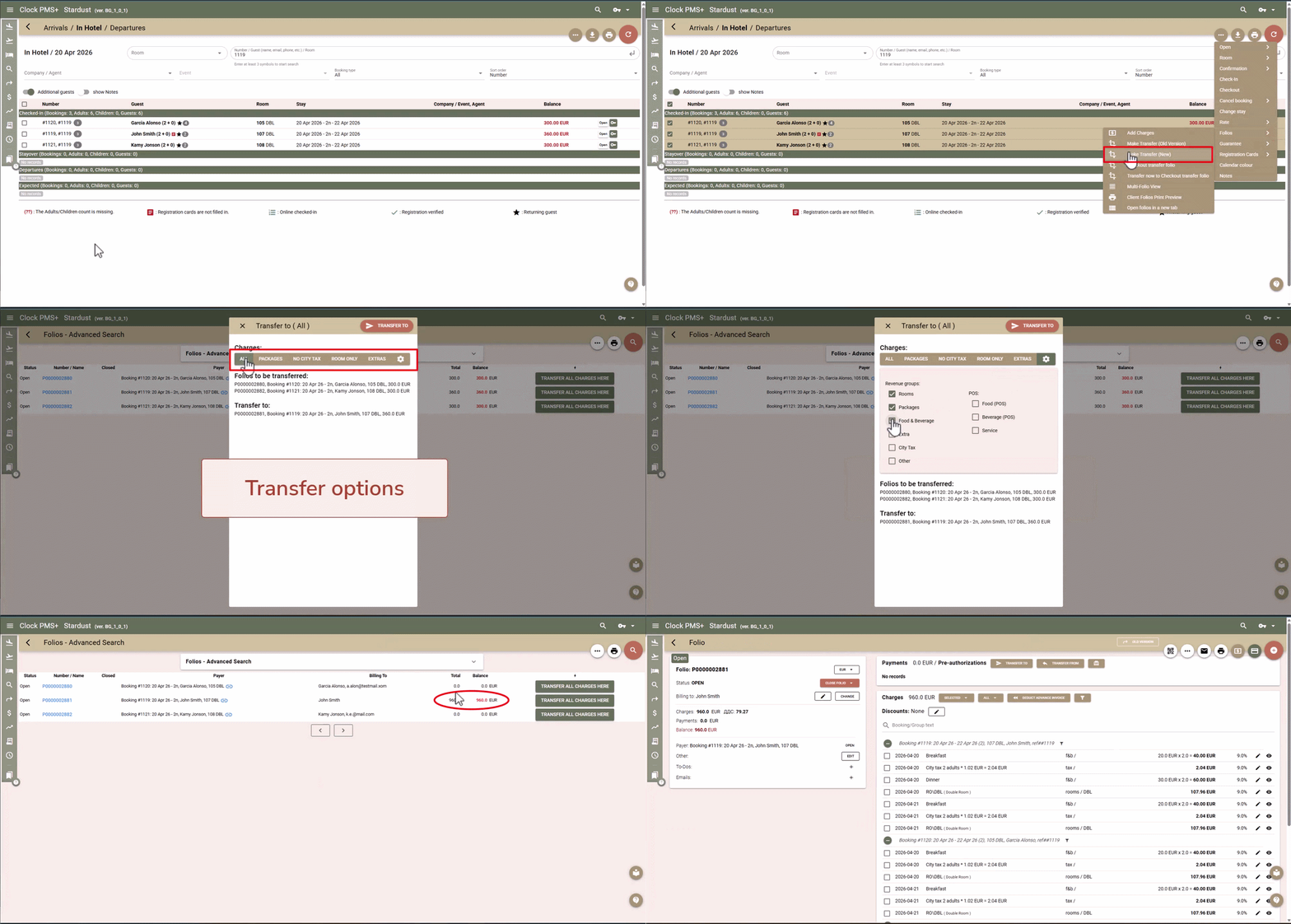
Learn more about bulk transfer.
Document Issue
Upon summarising the booking services into one folio, you can proceed with the document issue:
- From the Transfer screen, click on the number of the folio to which you have transferred the services;
- Follow the usual steps to close a folio and issue a document