
What is an SIE export?
SIE is a standard Swedish file format used to exchange accounting data between systems (for example, between a PMS/POS and an accounting system). The SIE export contains verifications (journal entries) with detailed transaction lines that can be imported into most Swedish accounting software.
In this integration, the Clock PMS SIE export produces(example included):
One #VER journal entry per exported business date
Multiple #TRANS transaction lines per day (revenue, VAT, payments, deposits, AR changes, etc.)
A final balancing line so each verification sums to 0.00 (balanced entry)
What data is included in the export?
The export consolidates accounting-relevant activity for each date in the selected period:
1) Revenue (Charges)
Charges are exported as accounting lines based on:
Accounting code (account)
Profit centre (cost centre)
Text/description Net revenue is exported to the revenue account
2) VAT (Tax on charges)
VAT is exported as separate transaction lines (unless configured otherwise for transfers), using a VAT account determined by the VAT Mapping configuration
3) Payments
Payments are exported based on:
Payment type/subtype
GL code and mapping logic inside your payment model
4) Deposit movement
Deposit movement represents the daily change of the deposits collected by the hotel, and as such, the consumed deposits for the day are subtracted from the newly received ones and are exported as a total for the day. Example: A new deposit of 1000 SEK have bene collected for the day. Additionally, a guest who has a deposit already collected on a previous date consumed services for 400 SEK. The service consumption lowers the amount of the deposit for that customer, and the Deposit movement to be exported for the day would be 600 SEK (1000-400)
5) Accounts Receivable (AR) change
AR change is exported as a separate line for every document related to the AR. However, the documents are exported only with their AR-relevant amount. Example: if an invoice is issued for 1000 SEK and the folio already contains payment collected during the booking creation of 300 SEK, the document will be exported with an amount of 700 SEK.
6) Open Customer Balance(Guest/Company ledger)
To balance the revenue payments, deposits and AR, it is also important to export the change of the services consumed for the guests for the day whose folios haven't been settled. Example: A customer stays overnight, and no payment has been registered to their folio yet. The revenue and tax from the night charge will be balanced against the Open Customer Balance.
7) Charges transferred from the restaurant
The charges transferred from the restaurant are exported differently from the regular ones. The restaurant and hotel can be separate financial units. The restaurant typically recognizes revenue and VAT already, while the hotel needs a settlement/clearing movement rather than duplicating restaurant revenue. When the charges are transferred to the hotel folio, a special payment type called Cross Account Transfer is registered in the restaurant. A special account is configured for this payment type to show that those charges were not paid, but the responsibility for the payment collection is transferred to the hotel(account debited). At the moment of transfer, those charges are mirrored in the hotel folio in order to change the balance of the customer. To avoid double revenue recognition, those charges are exported with the following specifics:
- Export one combined amount: (net + VAT)
- Do not export a separate VAT line for those charges
- Use the profit centre as defined in the restaurant
- Post to Internal Transfer(Restaurant to Hotel) Clearing Account instead of the normal revenue account
Note: To avoid manual reconciliation of the account defined for the Cross Account Transfer payment type and Internal Transfer(Restaurant to Hotel) Clearing Account, it is recommended to define the same account for both.
9) If you register the payments for the Accounts receivable documents in both Clock and your financial system.
If the payments are registered in both systems, obviously, they should not be exported from Clock to avoid duplications in your financial system. In such a case, define the Payment GL code to 9999.
Preparations
Configuring the Revenue Accounting code and Profit centre field
The account codes in Clock PMS+ are defined as a new field for the charge templates.
- Navigate to menu Settings -> All Settings -> Charge custom Fields > and check if a field with a name accounting_code / profit_centre already exists. If not, please create them with:
- Name: accounting_code and Type: string
- Name: profit_centre and Type: string
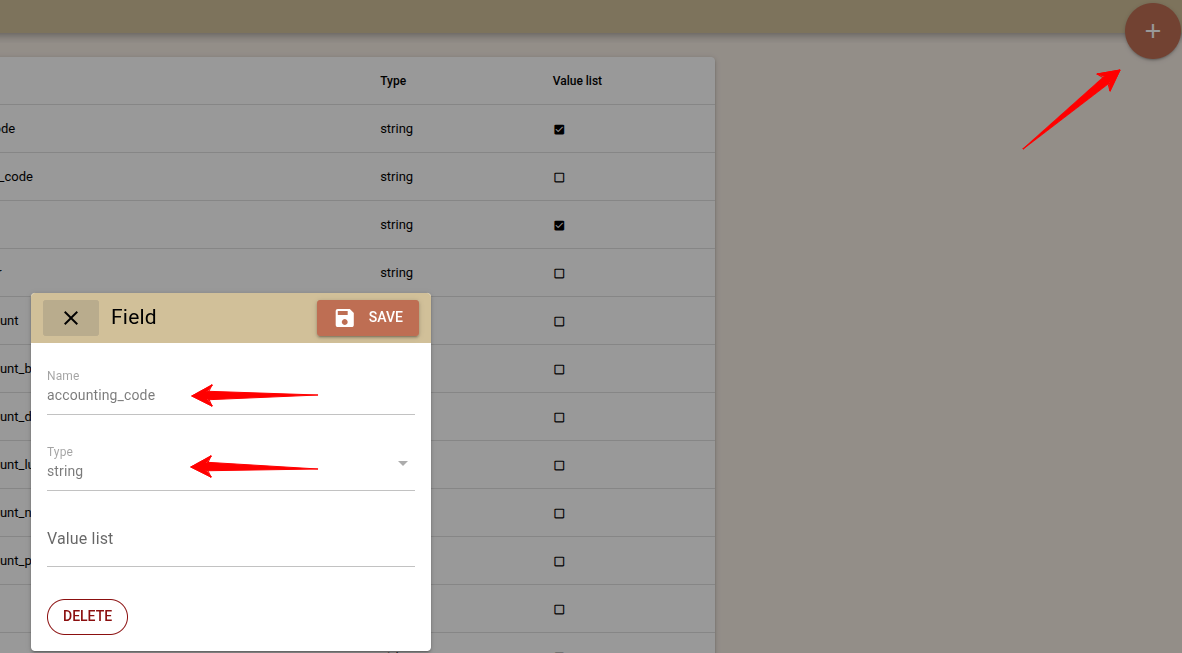
Once the accounting_code and profit_centre fields are created, you can start defining the account codes and profit centres for the list of charge templates.
- Navigate to menu Settings -> All Settings -> Charge Templates and edit each charge template and fill in the respective account code and profit centre.
Note: Keep in mind the accounting_code and profit_centre fields need to be filled in before posting charges to booking/folios. However, if you already have charges created, you can still update their Accounting code values using the Charge Custom Field Check Report.
Payment GL code configuration
- Navigate to menu Settings -> All Settings -> General ledger accounts, review the existing configurations, and create new ones specifying the attributes in the screen.
Note: The first match the system finds will assign the payment code. For example, if a code 123 is configured for Payment type = Bank and code 456 is configured for the combination Payment type = Bank and Payment subtype = National Bank, the system will find the first match, and the code will be 123. However, you can use the Sort order (ascending) to configure how the code configuration would apply, and if the code 123 has Sort order = 2 and 456 with Sort Order = 1, the latter will match first, and 123 will be the default one for the bank payments.
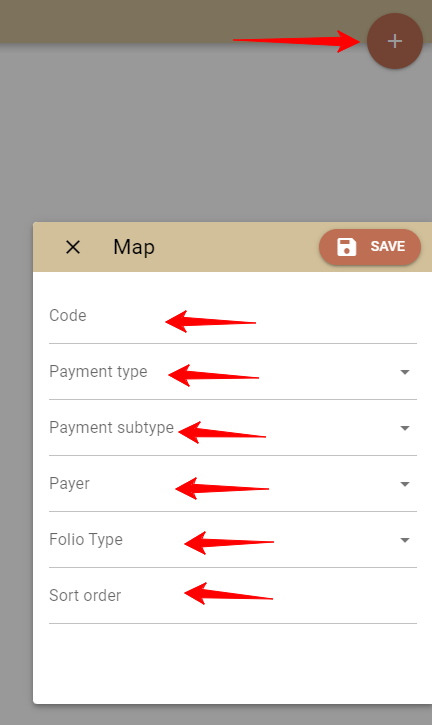
Unlike the Revenue accounting code, the change ot the General ledger account code will immediately affect the General ledger account of the payments.
Configuration
Activate SIE4 - Export from the AppConnector in Clock - menu Settings -> AppConnector. Locate SIE4 - Export and click 'Activate'.
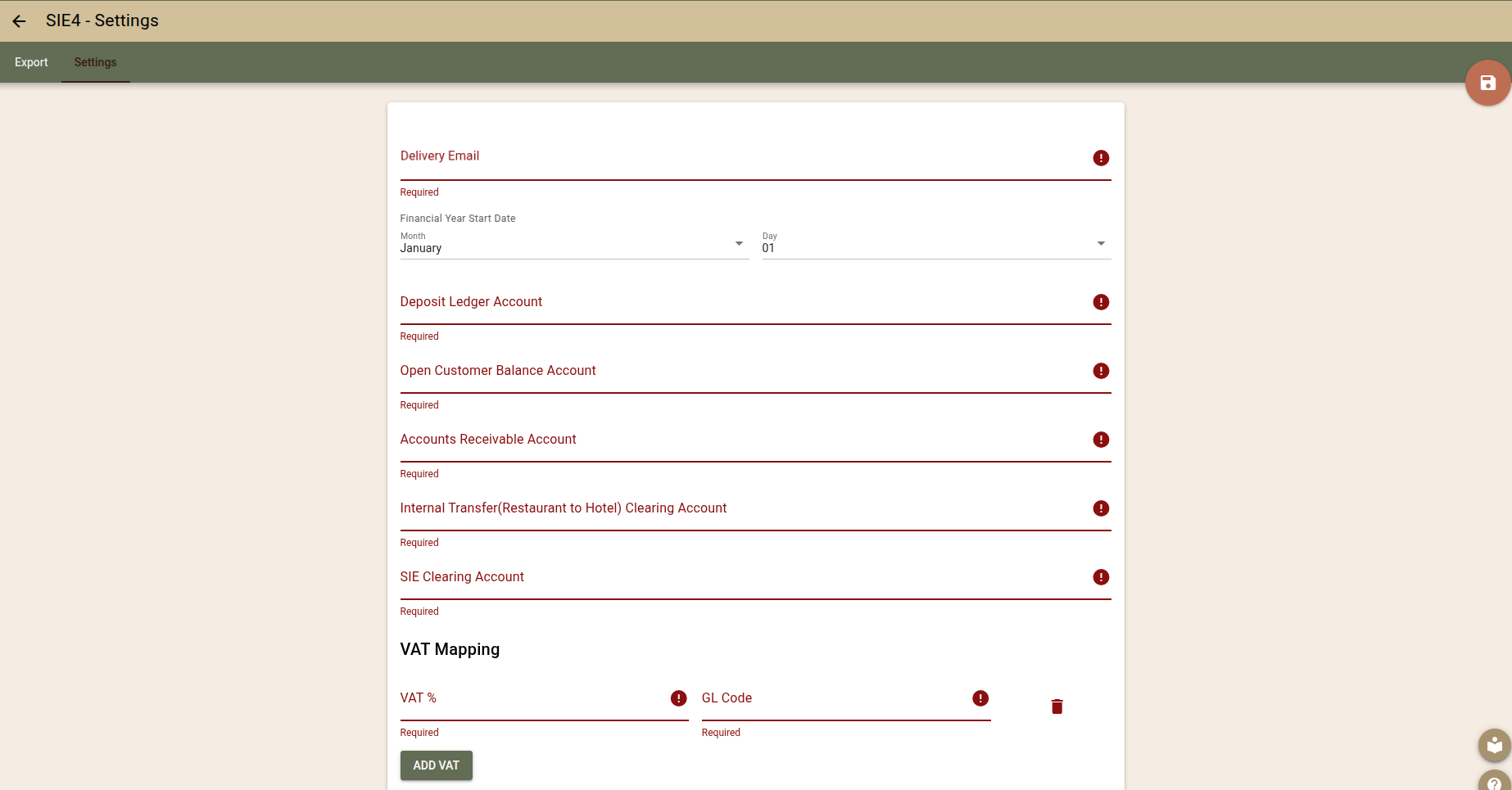
In Settings, define the following parameters for the export according to your needs
- Delivery email - set the email address on which you will receive the export file
- Financial Year Start Date - Defines the start date of the fiscal year selected for your company so it can be properly included in the export as required by the SIE format.
- Deposit Ledger Account - Defines the account used for deposit movement(advance payments/deposit consumption). Typical Swedish example:
2420(Förskott från kunder) or similar. - Open Customer Balance Account - Represents open balances that are not yet invoiced, settled or paid(guest folio balance / open debts). This line is used as a “control” for open items and helps represent changes in unsettled balances day-by-day. Common Swedish example: an internal clearing/open-items account, such as
1695or a dedicated “open items” account. - Internal Transfer(Restaurant to Hotel) Clearing Account - The restaurant and hotel can be separate financial units. The restaurant typically recognizes revenue and VAT already, while the hotel needs a settlement/clearing movement rather than duplicating restaurant revenue. Typical Swedish example:
1680(Fordringar hos koncernföretag) or another intercompany/clearing account, depending on the group structure. - Accounts Receivable Account - Defines the account used for accounts receivable changes (invoice issuance, corrections, cancellations, and AR-related payments netting) for Guest/company invoices that are issued and not paid immediately. Typical Swedish example:
1510(Kundfordringar) or a dedicated AR account. - Internal Transfer(Restaurant to Hotel) Clearing Account
- SIE Clearing Account - Define the account for a technical balancing line and is required to keep the SIE import valid and the entry balanced, even if there is rounding, some data is missing, or a mapping is incomplete.
- VAT Mapping - Please add all applicable VAT rates and the respective account codes for each one. Typical Swedish VAT Mapping configuration:
- VAT %: 6 | GL Code: 2630
- VAT %: 12 | GL Code: 2620
- VAT %: 25 | GL Code: 2610
Troubleshooting tips
“My SIE file is rejected by the accounting software.”
Most common reasons:
Wrong account lengths (some systems require 4 digits)
Missing revenue accounting code, profit center, or payment GL code configuration (please check the description in the Preparations section)
VAT account mapping doesn’t match the chart of accounts
“I did not receive my SIE file.”
Most common reasons:
- Please check your inbox SPAM folder
- Check if the configured Delivery email address is correct.
- Configure a different Delivery email and try again to make sure the problem is not in your inbox